
Blog post: What is Google Gemini and how is it different from ChatGPT?
AI Explainer · April 2026What is Google Gemini — and How Is It Actually Different from ChatGPT?
If you’ve been anywhere near a tech conversation lately, you’ve probably heard two names thrown around more than any others: ChatGPT and Google Gemini. They’re both AI assistants. They both answer questions, write emails, summarize documents, and generate code. But here’s the thing — they’re built on completely different ideas about what AI should be. And once you understand that, choosing between them (or knowing how to use both) becomes a whole lot easier.
Let’s start with the basics.
So, what exactly is Google Gemini?
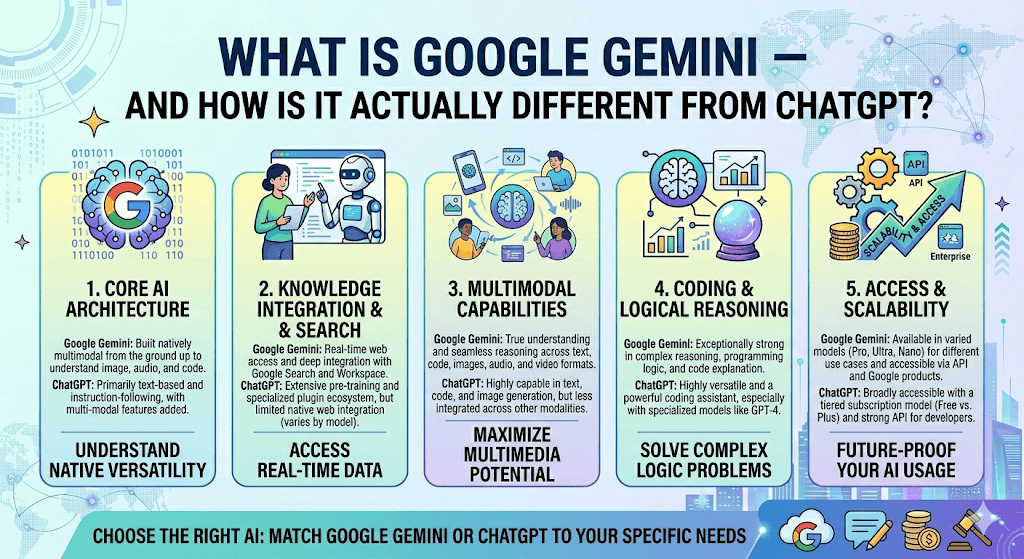
Google Gemini is the AI assistant built by Google DeepMind. It’s Google’s answer to the AI chatbot wave — but it goes beyond just chatting. Unlike many AI tools that were originally designed to handle text and then later “taught” to understand images or audio, Gemini was built from day one to handle multiple types of information at the same time: text, images, audio, video, and code, all natively and simultaneously.
Think of it as a single unified brain that can watch a video, read the transcript, and hear the audio — all at once — rather than passing each piece to a different specialist. That’s Gemini’s biggest architectural claim to fame.
As of early 2026, the Gemini family has grown significantly. Google now offers:
The flagship Gemini app is available for free, with paid tiers called Google AI Pro ($19.99/month) and Google AI Ultra ($249.99/month) for heavier users and professionals.
And ChatGPT — the other giant in the room
ChatGPT is OpenAI’s conversational AI, and it’s the product that arguably kicked off the current AI revolution when it launched in late 2022. As of 2026, it runs on GPT-5.4 — a model that OpenAI describes as a unified system capable of switching between quick responses and deep, expert-level reasoning depending on the complexity of the task.
ChatGPT started as a purely text-based assistant but has steadily expanded into images (via DALL-E), voice, file analysis, and even computer use — the ability to operate your desktop and applications autonomously. Its GPT-5.4 release in March 2026 reportedly reached 75% on OSWorld benchmarks, outperforming most humans at desktop computer tasks.
The key differences — where they actually diverge
On the surface, Gemini and ChatGPT look very similar. But dig a little deeper and you’ll find they were built for quite different things.
| Feature | Google Gemini | ChatGPT |
|---|---|---|
| Architecture | Natively multimodal from the ground up — text, images, audio, video processed together | Modular — specialists like DALL-E handle images; primarily text-first design |
| Context window | Up to 1 million tokens (~1,500 pages of text) | 1 million tokens (GPT-5.4), but 32K output vs Gemini’s 65K |
| Ecosystem | Deep native integration with Gmail, Drive, Docs, Maps, YouTube, Calendar | Connects to third-party tools (Drive, GitHub, Dropbox) but no native Google tie-ins |
| Real-time search | Always-on access to the full Google index by default | Available, but historically required a paid plan or toggle |
| Video & audio | Native — can process video and audio inputs directly | GPT-5.4 still lacks native video/audio processing |
| Computer use | Available via Google Labs (Antigravity agent) | GPT-5.4 leads with 75% OSWorld benchmark — best-in-class desktop automation |
| Pricing (paid) | AI Pro: $19.99/month · AI Ultra: $249.99/month | ChatGPT Plus: ~$20/month · Pro: higher tiers available |
| Free tier | More generous — access to Gemini 3 Flash and real-time search | Capable, but more limited model access on free |
Where Gemini shines
1. Google ecosystem users
If your life runs through Gmail, Google Drive, Google Docs, or Google Calendar, Gemini is in a league of its own. It can pull your emails, summarize your schedule, search your Drive files, and even help you respond to messages — all within one assistant. ChatGPT can connect to some of these tools, but it requires third-party connectors and never feels as seamlessly woven in.
2. Multimodal and research tasks
Gemini’s massive 1-million-token context window, combined with its native ability to process video and audio, makes it exceptional for research-heavy work. The Deep Research feature can autonomously plan and execute multi-step research tasks, pulling from the web and synthesizing dense results — even generating visuals in reports for Ultra subscribers.
3. Real-time information
Gemini has direct, default access to Google’s search index, which means it’s typically more current and accurate for news, recent events, or fast-moving topics. ChatGPT has narrowed this gap with monthly model updates, but Gemini’s search integration is native rather than bolted on.
4. Affordability at scale
At the API level, Gemini Flash models are reported to be 20 to 40 times cheaper than comparable alternatives — a massive advantage for developers building AI-powered products at volume.
Where ChatGPT still has the edge
1. Writing and creative tone
Most independent tests in 2026 still find ChatGPT to produce more natural, reader-friendly prose. It’s more conversational, flows better for long-form content, and tends to produce creative writing that feels less like a report and more like a person wrote it. Gemini is concise and informative, but sometimes errs on the side of factual over engaging.
2. Developer ecosystem
The sheer breadth of tools, plugins, and platforms that integrate with GPT models gives ChatGPT an enormous head start in third-party adoption. If you’re building AI-powered products and want maximum ecosystem flexibility, GPT-5.4 is still the benchmark.
3. Desktop computer automation
GPT-5.4’s computer use capability is currently considered the most advanced available — capable of operating desktop software at a level that rivals human performance in benchmark testing.
Google Gemini — best for
- Google Workspace users
- Multimodal inputs (video, audio, images)
- Real-time research and web search
- Large document analysis
- Budget-conscious API usage
- Students and education plans
ChatGPT — best for
- Long-form writing and creative work
- Developer tooling & plugins
- Desktop computer automation
- Structured reasoning and code
- Casual, conversational interactions
- Third-party integrations
Which one should you use?
Here’s the honest answer: the smartest move in 2026 is to use both. They’ve reached near-parity on overall intelligence benchmarks — both GPT-5.4 and Gemini 3.1 Pro score 57 on the Artificial Analysis Intelligence Index. The real question isn’t which is smarter. It’s which one fits your workflow.
A practical approach many professionals use today: turn to Gemini for research, document analysis, and anything that lives in Google’s world. Switch to ChatGPT for drafting, creative writing, coding, and complex reasoning chains. Use them like different tools in a toolbox, not contestants in a battle.
Bottom line: Google Gemini is Google’s bold bet that the future of AI is multimodal — woven into your apps, your search, your camera, and your documents. ChatGPT is OpenAI’s bet that the best AI assistant is one with extraordinary language fluency and a massive ecosystem of integrations. Both bets are paying off. And as a user, you win either way.
Final thoughts
A few years ago, the gap between these tools was stark. Today, they’ve never been more evenly matched. What makes the difference now isn’t raw capability — it’s fit. Gemini and your Google life are made for each other. ChatGPT and your writing workflow are too. The best AI isn’t the one with the highest benchmark score. It’s the one that quietly makes your day a little easier.
Sources: Google Gemini release notes, Google AI Developer docs, 9to5Google, Backlinko, G2, GuruSup AI comparison — all verified April 2026.

