
Introduction: The Year AI Stopped Being a Demo
In early 2024, “agentic AI” was a phrase you’d find in research papers. Today, Gartner forecasts that by the end of 2026, roughly 40% of enterprise software applications will include task-specific AI agents, up from less than 5% a year earlier. That is not incremental change. That is a category being rebuilt in real time.
Here is the part most headlines miss: the AI story of 2026 is no longer about which model scored highest on a benchmark. It is about whether AI actually shows up in your workflow on a Tuesday afternoon and saves you forty minutes. The winners are not the labs with the flashiest demos. They are the teams quietly wiring AI into the boring, repeatable work that fills a calendar.
If you have felt overwhelmed trying to keep up with AI news, you are not behind, you are just being asked to drink from a firehose. This post is the filter. We will cover the tools that matter, the trends worth your attention, and a practical framework for adopting AI without getting burned. Whether you run a business, manage a team, or are simply AI-curious, you will leave with something you can use this week.
Why AI Adoption Is Accelerating So Fast
A few numbers explain the moment we are in. Across recent 2026 industry surveys, around 88% of organizations report using AI in at least one business function. Gartner’s early-2026 forecast put worldwide AI spending at roughly $2.52 trillion for the year, a sharp jump driven largely by infrastructure investment. And employees who use AI regularly report meaningful productivity gains, with controlled studies typically landing in the 25% to 55% range depending on the task.
Several forces are compounding at once:
- Costs are falling. Frontier-model pricing keeps dropping, and capable open and lower-cost models put strong tools within reach of small teams and solo operators.
- Tools got easier. No-code and turnkey platforms mean you no longer need an engineering team to deploy useful AI.
- The work shifted from chat to action. AI is moving from answering questions to completing multi-step tasks across your other software.
That last point is the headline trend of the year, so it deserves its own section.
The Defining Trend of 2026: Agentic AI
What “agentic” actually means
A chatbot answers. An agent acts. Agentic AI describes systems that can plan a goal, use tools, take steps across different applications, and adjust based on results, all with limited human supervision. Instead of “draft me an email,” the ask becomes “find every overdue invoice, draft the reminders, and schedule them for 9 a.m.”
Where it stands today
Adoption is genuine but uneven. Industry trackers put the agentic AI market growing more than 40% year over year, yet a familiar gap persists between pilots and production. Only around a quarter of organizations report they are truly scaling agents, and analysts expect a large share of early agentic projects to be cancelled, usually because of unclear business value or weak risk controls, not because the technology fails.
The lesson is encouraging and sobering at once: agents work, but only when pointed at a clearly defined, measurable workflow.
Real-world use cases
- Customer support: Agents triage tickets, draft responses, and resolve routine requests, freeing humans for complex cases.
- Sales and operations: Workflow automation, updating CRMs, generating reports, scheduling, is the single most common deployment, appearing in the majority of agent rollouts.
- Healthcare documentation: In one deployment, clinicians using an AI agent cut documentation time by around 42%, saving roughly an hour a day.
- Software development: GitHub Copilot now reports over 15 million users, and tools like Copilot Studio are used by hundreds of thousands of organizations.
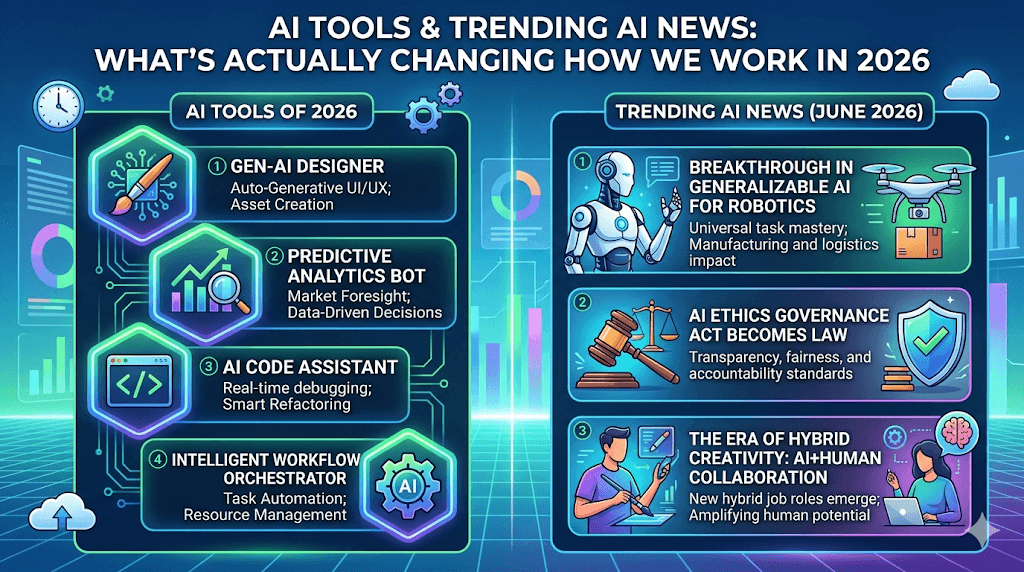
The AI Tools Worth Knowing in 2026
You do not need fifty tools. You need the right few for your work. Here is a practical map by category.
General-purpose assistants
The large conversational models, including offerings from Anthropic, OpenAI, and Google, remain the backbone for writing, analysis, research, and brainstorming. They are increasingly multimodal (text, image, voice, and document input) and increasingly capable of taking actions, not just producing text.
Coding and developer tools
AI pair programmers have moved from autocomplete to genuine collaborators that can scaffold features, write tests, and debug across a codebase. For developers, this is arguably the most mature and highest-ROI category in all of AI.
Workflow and automation platforms
This is where agentic AI meets everyday business. Platforms that connect your apps, such as CRM, email, calendars, and databases, let non-technical users build automations triggered by goals or events. Think of them as the connective tissue between your AI and your existing software.
Creative and media tools
AI now handles image generation, video, voice, and dubbing at a quality that was experimental a year ago. Voice and dubbing tools can preserve tone, timing, and emotion across dozens of languages, opening global reach to small creators.
Vertical and industry-specific tools
The fastest-growing value is not in general AI but in task-specific systems built for a single industry, such as legal contract review, medical lab-result interpretation, or financial analysis. These tend to outperform general tools because they are tuned to the domain and its rules.
A Practical Framework: How to Adopt AI Without the Hype
The biggest mistake teams make is collecting tools instead of changing a workflow. Here is a step-by-step approach that consistently works.
- Pick one recurring task. Choose something repetitive, time-consuming, and well-defined, like weekly reporting or first-draft customer replies. Resist the urge to “AI everything” at once.
- Add a human review step. Keep a person in the loop, especially for anything high-stakes. Fluent output can still be wrong, and confidence is not accuracy.
- Protect your data. Understand what information you are sharing, use business-grade tools with clear data policies, and never paste sensitive data into consumer apps.
- Measure honestly. Track hours saved against errors introduced. If you cannot measure improvement, you cannot defend the investment.
- Document and scale. Once a workflow reliably saves time, write it down, train the team, then move to the next task.
Key insight: Healthy AI adoption looks operational, not flashy. A support queue that routes faster or a contract review that drops from hours to minutes beats any impressive demo.
The Risks Nobody Should Ignore
AI is powerful, not infallible. The most common pitfalls in 2026 are:
- False confidence. Models produce fluent, persuasive answers that can be factually wrong. Verify anything that matters.
- Data leakage. Sensitive information entered into the wrong tool can be exposed or retained. Set clear policies.
- Generic output. Over-reliance on AI for content can flatten your brand voice. Use it as a starting point, not the final word.
- Vendor hype. Many tools promise more than they deliver. Run a small pilot before committing budget.
- The pilot trap. Many demos, many tools, no workflow measurably changed end to end. This is the single most common reason AI initiatives stall.
Governance matters too. In regulated fields, such as healthcare, finance, and law, the blockers are auditability, explainability, and accountability, and surveys suggest only about a third of organizations have reached real maturity in AI governance.
How to Stay Current Without Burning Out
Trying to read every AI headline is a recipe for fatigue. A lighter approach:
- Choose two or three trusted sources and skim a weekly roundup rather than chasing daily news.
- Filter for “what shipped,” not “what was announced.” Demos and benchmarks rarely change your work; available features do.
- Follow your use case, not the whole field. A marketer and a developer need different signals.
- Test, don’t just read. One hour experimenting with a tool teaches you more than ten articles about it.
Key Takeaways
- AI has moved from demo to default. Around 88% of organizations now use AI in at least one function, and spending is measured in the trillions.
- Agentic AI is the defining trend of 2026, shifting AI from answering questions to completing multi-step tasks, though the gap between pilots and production remains wide.
- You don’t need every tool. Match a small set of tools to your actual work: assistants, coding, automation, creative, and industry-specific.
- Adopt one workflow at a time, keep a human in the loop, protect your data, and measure hours saved against mistakes.
- The real risks are false confidence, data leaks, and the pilot trap. Tools that quietly improve a workflow beat flashy demos every time.
Frequently Asked Questions
1. What is the difference between an AI tool and an AI agent?
A traditional AI tool responds to a single prompt, such as writing text or answering a question. An AI agent can pursue a goal across multiple steps and applications with limited supervision, for example completing an entire reporting workflow rather than drafting one paragraph.
2. Are AI tools safe to use with company data?
They can be, if you choose business-grade tools with clear data-handling policies and avoid pasting sensitive information into consumer apps. Always confirm whether your inputs are used for training and set internal usage guidelines.
3. Which AI tool should a beginner start with?
Start with a general-purpose assistant for writing and research, then add one automation or industry-specific tool once you have a specific recurring task in mind. Begin with the problem, not the tool.
4. Will AI replace jobs?
AI is reshaping roles more than eliminating them outright. Many tasks are being automated, while new roles emerge around oversight, strategy, and AI management. The most resilient professionals are those who learn to direct AI rather than compete with it.
5. How do I keep up with AI news without getting overwhelmed?
Pick a few trusted weekly sources, focus on features that have actually shipped, and follow only the developments relevant to your work. Experimenting hands-on beats passive reading.
Conclusion: From Spectator to Operator
The AI conversation has matured. We are past the stage of asking whether these tools work and into the harder, more useful question of how to use them well. The data is clear: AI is now embedded in how serious organizations operate, and agentic systems are pushing that integration deeper every quarter.
But the opportunity is not reserved for big enterprises. The same tools, falling costs, and no-code platforms that power large companies are available to freelancers, small teams, and curious individuals. The advantage goes to whoever moves from spectator to operator first.
Your move: Pick one repetitive task in your week, choose a single AI tool to handle it, add a human review step, and run it for the next seven days. Then come back and tell me what you learned, what saved you time, what surprised you, and what you would never trust AI to do alone. The future of work is not something to read about. It is something to build, one workflow at a time.
If this guide helped, share it with someone still standing on the sidelines, and subscribe for the next breakdown of AI tools that are actually worth your time.

