
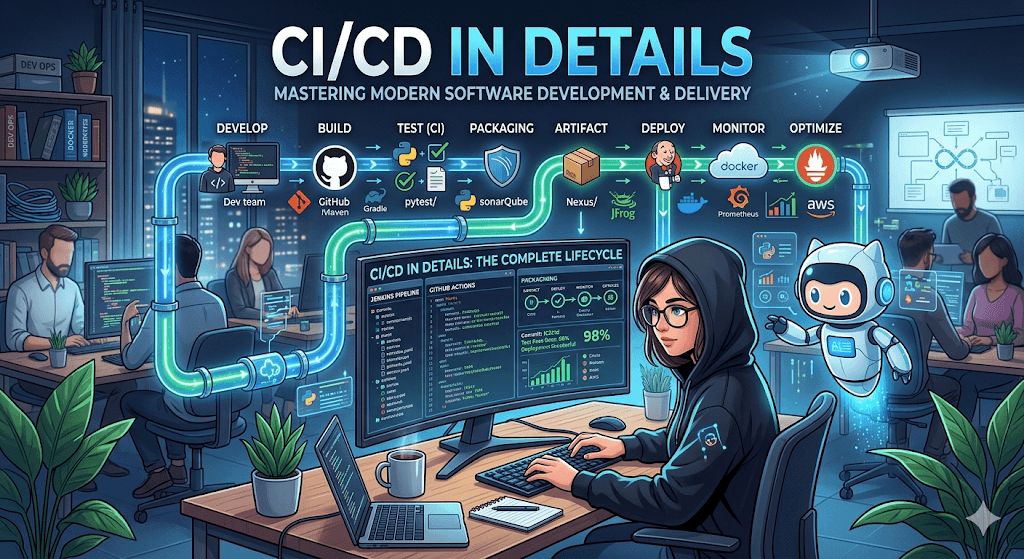
The complete guide to Continuous Integration and Continuous Delivery — from first commit to production in minutes, not months.
Software once shipped in shrink-wrapped boxes on yearly cycles. Today, elite teams deploy hundreds of times per day. The machinery that makes this possible — CI/CD — has become the backbone of modern software engineering. This guide pulls back the curtain on every stage, principle, and practice you need to master it.
What Is CI/CD, Really?
CI/CD stands for Continuous Integration and Continuous Delivery (or Continuous Deployment). These aren’t just buzzwords — they represent a fundamental philosophy: software should always be in a releasable state, and getting it there should be automated, repeatable, and fast.
Continuous Integration is the practice of merging all developer working copies into a shared mainline several times a day. Every merge triggers an automated build and test sequence, catching conflicts and defects within minutes rather than weeks.
Continuous Delivery extends this by ensuring code is always deployable. Every change that passes automated testing is a release candidate. The decision to push to production remains a human one.
Continuous Deployment goes further — every change that passes the pipeline goes directly to production with zero human intervention. This is the endgame: a fully automated path from commit to customer.
Continuous Delivery means your code can be deployed at any time. Continuous Deployment means it is deployed every time. The difference is a manual approval gate.
The Anatomy of a CI/CD Pipeline
A pipeline is a series of automated stages that code must pass through before reaching production. While every organization customizes their pipeline, the canonical structure looks like this:
Each stage acts as a quality gate. If any stage fails, the pipeline halts and the team is immediately notified. Let’s examine every stage in depth.
Stage 1 — Source & Commit
Everything begins with version control. A developer pushes code to a shared repository — typically Git-hosted on GitHub, GitLab, or Bitbucket. This push event triggers the pipeline automatically via a webhook.
The branching strategy matters enormously here. The most common patterns are trunk-based development (small, frequent merges to main) and GitFlow (long-lived feature branches with release branches). Trunk-based development is widely favored in CI/CD-mature organizations because it minimizes merge conflicts and encourages smaller, safer changesets.
name: CI Pipeline

on:
  push:
    branches: [main, develop]
  pull_request:
    branches: [main]

jobs:
  build-and-test:
    runs-on: ubuntu-latest
    steps:
      - uses: actions/checkout@v4
      - name: Install dependencies
        run: npm ci
      - name: Run tests
        run: npm test -- --coverage
      - name: Build
        run: npm run build
Stage 2 — Build
The build stage compiles source code, resolves dependencies, and produces an executable artifact. For compiled languages (Java, Go, Rust), this means producing binaries. For interpreted languages (Python, JavaScript), it might involve transpilation, bundling, or container image creation.
Reproducibility is paramount. The build should be deterministic — the same input must always produce the same output. This is achieved by pinning dependency versions (lock files), using immutable base images, and eliminating environmental side effects.
Modern pipelines containerize the build itself, running it inside a Docker image that contains all toolchains. This eliminates the “works on my machine” problem at the CI level.
# Build stage
FROM node:20-alpine AS builder
WORKDIR /app
COPY package*.json ./
RUN npm ci --production=false
COPY . .
RUN npm run build

# Production stage
FROM node:20-alpine AS runtime
WORKDIR /app
COPY --from=builder /app/dist ./dist
COPY --from=builder /app/node_modules ./node_modules
EXPOSE 3000
CMD ["node", "dist/server.js"]
Stage 3 — Automated Testing
Testing is the heart of CI/CD. Without comprehensive automated tests, a pipeline is just a fast way to ship bugs. A mature test suite operates at multiple levels, often described as the testing pyramid.
Unit Tests
Unit tests validate individual functions or methods in isolation. They’re fast (milliseconds each), cheap to write, and form the broad base of your pyramid. A well-tested codebase typically has thousands of these, achieving 80%+ code coverage.
Integration Tests
Integration tests verify that modules work correctly together — database queries return expected results, API endpoints respond to valid payloads, services communicate over the network. They’re slower than unit tests but catch an entirely different class of defect.
End-to-End (E2E) Tests
E2E tests simulate real user behavior. Tools like Playwright, Cypress, and Selenium drive a browser through critical workflows: sign up, purchase, checkout. These are the slowest and most fragile tests, so teams keep the suite focused on high-value user journeys.
Beyond Functional Testing
Mature pipelines also include static analysis (linting, type checking), security scanning (SAST/DAST, dependency vulnerability checks), performance testing (load tests, benchmarks), and contract testing for microservice APIs.
If a test can’t fail, it has no value. If a test is flaky — sometimes passing, sometimes failing with no code change — it’s worse than no test at all because it erodes trust in the entire pipeline.
Stage 4 — Artifact Packaging
Once code passes all tests, it’s packaged into a versioned, immutable artifact. This could be a Docker image pushed to a container registry, a JAR file uploaded to Nexus, or a zipped Lambda deployment package stored in S3.
The key principle: build once, deploy everywhere. The same artifact that ran in staging is the one that runs in production. Configuration differences between environments are injected at deploy time through environment variables or a secrets manager — never baked into the artifact.
Stage 5 — Staging & Pre-Production
Before reaching production, artifacts are deployed to one or more pre-production environments. The staging environment should mirror production as closely as possible — same infrastructure, same data shapes (anonymized), same network topology.
This is where smoke tests run: lightweight checks that the application boots, serves its health endpoint, and can connect to its dependencies. Some teams add canary analysis at this stage, comparing metrics from the new version against the current production baseline.
Stage 6 — Deployment Strategies
How code reaches production is as important as whether it works. Different strategies offer different trade-offs between speed, safety, and complexity.
| Strategy | How It Works | Risk Level | Best For |
|---|---|---|---|
| Rolling Update | Gradually replaces old instances with new ones | Medium | Stateless services, Kubernetes workloads |
| Blue/Green | Two identical environments; traffic switches atomically | Low | Zero-downtime requirements, easy rollback |
| Canary | Routes a small percentage of traffic to the new version | Low | Large-scale services, gradual validation |
| Feature Flags | Deploys code dark; toggles enable features independently | Very Low | Decoupling deployment from release |
| Recreate | Shuts down old version entirely, starts new | High | Dev/test environments, non-critical services |
The Seven Principles of Effective CI/CD
Tools are just tools. What separates a world-class pipeline from a slow, brittle one is the principles it’s built on.
Commit Early, Commit Often
Small, frequent commits reduce merge conflicts and make it easier to isolate the cause of failures. If your feature branches live longer than two days, your CI is already struggling.
Fix Broken Builds Immediately
A red pipeline is an emergency. The team stops and fixes it before writing any new code. This is non-negotiable — if broken builds are tolerated, the entire CI safety net collapses.
Automate Everything
If a human has to do it more than twice, script it. Builds, tests, deployments, rollbacks, infrastructure provisioning — all of it. Manual steps introduce variance and bottlenecks.
Keep the Pipeline Fast
Target under 10 minutes for the core feedback loop (build + unit tests). Slow pipelines discourage frequent commits and destroy developer flow. Use parallelism, caching, and incremental builds aggressively.
Version Everything
Application code, infrastructure-as-code, pipeline definitions, configuration — all in version control. If it can’t be reviewed in a pull request, it shouldn’t exist.
Make Builds Self-Testing
A build without tests is just a compilation check. Every pipeline run should automatically verify that the software works as intended through a comprehensive automated test suite.
Everyone Can See What’s Happening
Pipeline status, test results, deployment history, and metrics must be visible to the entire team. Transparency builds trust and accountability. Dashboards, Slack notifications, and build monitors are essential.
The CI/CD Tool Landscape
The ecosystem is vast and evolving. Here’s how the major players stack up across different categories.
CI/CD Platforms
GitHub Actions has become the default for open-source and many commercial projects — deeply integrated with GitHub, generous free tiers, and a massive marketplace of reusable actions. GitLab CI/CD offers a unified platform experience where source control, CI, and deployment live under one roof. Jenkins, the long-standing veteran, remains powerful but requires significant operational overhead. CircleCI and Buildkite compete on speed and flexibility for teams with specialized needs.
Container Orchestration
Kubernetes is the industry standard for container orchestration, with built-in support for rolling updates, health checks, and auto-scaling. Tools like Argo CD and Flux bring GitOps to Kubernetes — the desired state of the cluster is declared in Git, and any drift is automatically reconciled.
Infrastructure as Code
Terraform and OpenTofu handle multi-cloud infrastructure provisioning. Pulumi allows infrastructure definitions in general-purpose languages. Cloud-native options like AWS CDK and Azure Bicep integrate tightly with their respective platforms.
GitOps takes CI/CD to its logical conclusion: Git is the single source of truth for everything — application code, infrastructure, and cluster configuration. Push to Git, and the system converges to the declared state automatically. Argo CD and Flux are the leading implementations.
Security in the Pipeline — DevSecOps
Security can’t be an afterthought bolted on before release. DevSecOps integrates security checks at every pipeline stage: pre-commit hooks that scan for secrets, SAST tools that analyze source code for vulnerabilities, dependency scanners that flag known CVEs, container image scanners that check for insecure base layers, and DAST tools that probe the running application.
The principle is “shift left” — catch vulnerabilities as early as possible, when they’re cheapest to fix. A vulnerability found in a developer’s IDE is a five-minute fix. The same vulnerability found in production is an incident.
security-scan:
  runs-on: ubuntu-latest
  steps:
    - name: Scan for secrets
      uses: trufflesecurity/trufflehog@main

    - name: Dependency vulnerability check
      run: npm audit --audit-level=high

    - name: Static analysis (SAST)
      uses: github/codeql-action/analyze@v3

    - name: Container image scan
      uses: aquasecurity/trivy-action@master
      with:
        image-ref: myapp:${{ github.sha }}
        severity: HIGH,CRITICAL
Observability & Feedback Loops
Deployment is not the end of the pipeline — it’s the beginning of the feedback loop. Observability means having rich, real-time data about how your application behaves in production: request latency, error rates, resource utilization, and business metrics.
The three pillars of observability — logs, metrics, and traces — feed back into the deployment process. Canary deployments use production metrics to decide whether to promote or roll back. Automated rollback triggers fire when error rates spike above thresholds. Post-deployment verification tests confirm critical paths still work.
Tools like Datadog, Grafana + Prometheus, New Relic, and OpenTelemetry form the observability layer that closes the loop between deploy and validate.
Measuring Success — DORA Metrics
The DORA (DevOps Research and Assessment) team identified four key metrics that predict software delivery performance. These are the metrics every CI/CD-driven team should track.
| Metric | Elite | High | Medium | Low |
|---|---|---|---|---|
| Deployment Frequency | Multiple per day | Weekly–daily | Monthly–weekly | Monthly+ |
| Lead Time for Changes | Under 1 hour | 1 day–1 week | 1 week–1 month | 1 month+ |
| Change Failure Rate | 0–15% | 16–30% | 16–30% | 46–60% |
| Time to Restore Service | Under 1 hour | Under 1 day | 1 day–1 week | 1 week+ |
Elite performers don’t just deploy fast — they deploy safely. High deployment frequency with a low change failure rate is the hallmark of a mature CI/CD practice.
Common Pitfalls & How to Avoid Them
Flaky tests: Tests that intermittently fail without code changes destroy pipeline confidence. Quarantine them, fix them, or delete them. Never just re-run the pipeline and hope.
Monolith pipelines: A single pipeline that takes 45 minutes to run discourages small, frequent commits. Break it into parallel stages and run expensive tests only on the main branch.
Snowflake environments: If staging doesn’t match production, testing there is theatre. Use infrastructure-as-code to ensure parity. Containerization helps enormously here.
Secrets in code: Hardcoded credentials in a repository are a ticking time bomb. Use a vault (HashiCorp Vault, AWS Secrets Manager) and inject secrets at runtime. Scan for leaks in pre-commit hooks.
Ignoring the culture: CI/CD is as much a cultural practice as a technical one. If developers don’t write tests, don’t review code promptly, or don’t own their deployments, no tool will save you.
The Path Forward
CI/CD is not a destination — it’s a discipline. It demands investment in automation, a commitment to testing, a culture of shared ownership, and a willingness to continuously improve the pipeline itself.
Start where you are. If you don’t have automated tests, write one. If your builds take an hour, optimize the slowest stage. If deploys are scary, add a canary. Every improvement compounds.
The organizations that master CI/CD don’t just ship faster — they ship with confidence. And confidence is what lets teams innovate rather than just maintain.

