
Most AI projects don’t fail because of a weak model. They fail because of everything around it: data that arrives late, features that differ between training and production, and notebooks that can’t be reproduced six months later. The model is often the easy part.
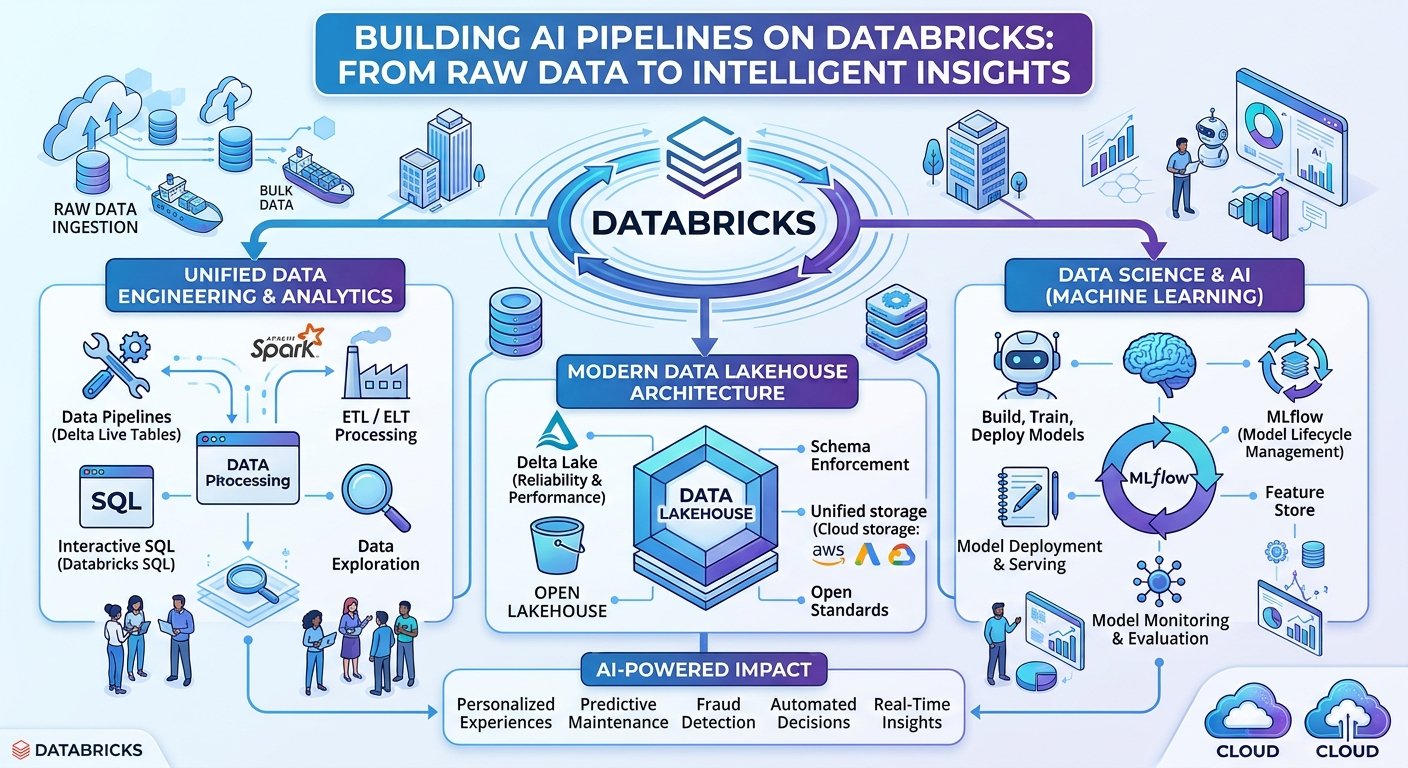
Databricks addresses this by putting data engineering, analytics, and machine learning on one platform, so you aren’t stitching together five tools and hoping the seams hold. This article walks through what an end-to-end AI pipeline looks like on Databricks, from raw ingestion to a monitored model serving predictions.
The Architecture at a Glance
A well-designed pipeline moves data through four stages:
- Ingest raw data reliably and incrementally
- Refine it into trusted, analytics-ready tables
- Model it with features, training, and experiment tracking
- Serve and monitor predictions in production
The Lakehouse architecture ties these together. Delta Lake provides the storage layer with ACID transactions, and Unity Catalog provides governance across every stage. Let’s take each stage in turn.
Stage 1: Ingest with Auto Loader
Raw data rarely arrives clean or on a schedule. Files land in cloud storage at unpredictable times, schemas drift, and upstream systems change without warning. Auto Loader handles this by incrementally detecting and processing new files as they arrive, with built-in schema inference and evolution.
raw_df = (
spark.readStream
.format(“cloudFiles”)
.option(“cloudFiles.format”, “json”)
.option(“cloudFiles.schemaLocation”, “/checkpoints/orders_schema”)
.load(“/landing/orders/”)
)
(raw_df.writeStream
.option(“checkpointLocation”, “/checkpoints/orders_bronze”)
.trigger(availableNow=True)
.toTable(“main.sales.orders_bronze”))
This is the bronze layer: raw data, stored as it arrived, with minimal transformation. Keeping an untouched copy means you can always replay history when business logic changes, which it will.
Stage 2: Refine with the Medallion Pattern
The medallion architecture organizes data into progressively higher quality layers:
- Bronze: raw, append-only, full fidelity
- Silver: cleaned, deduplicated, validated, and conformed
- Gold: aggregated, business-ready tables that serve dashboards and ML features
For the silver and gold layers, Lakeflow Declarative Pipelines (formerly Delta Live Tables) lets you define transformations declaratively and attach data quality rules directly to them:
import dlt
from pyspark.sql.functions import col, to_timestamp
@dlt.table(comment=”Cleaned orders”)
@dlt.expect_or_drop(“valid_amount”, “order_amount > 0”)
@dlt.expect_or_drop(“valid_customer”, “customer_id IS NOT NULL”)
def orders_silver():
return (
dlt.read_stream(“orders_bronze”)
.withColumn(“order_ts”, to_timestamp(col(“order_ts”)))
.dropDuplicates([“order_id”])
)
Instead of writing orchestration code to manage dependencies, retries, and lineage, you declare what each table should contain. The platform works out the execution graph. Expectations like expect_or_drop make data quality a first-class, observable part of the pipeline rather than an afterthought buried in a notebook.
Stage 3: Build Features and Train Models
Once you have trusted gold-layer data, the machine learning work begins. Two practices matter most here.
Centralize your features. Training/serving skew, where a feature is computed one way in training and another in production, is one of the most common causes of silent model degradation. Registering features in Unity Catalog as a feature table (or via Databricks Feature Engineering) lets training and inference use the same definitions.
from databricks.feature_engineering import FeatureEngineeringClient
fe = FeatureEngineeringClient()
fe.create_table(
name=”main.ml.customer_features”,
primary_keys=[“customer_id”],
df=customer_features_df,
description=”Rolling 90-day purchase behavior”,
)
Track every experiment with MLflow. MLflow is integrated into Databricks, so parameters, metrics, and artifacts are logged with a few lines, and models are registered to Unity Catalog with versioning and aliases.
import mlflow
from sklearn.ensemble import GradientBoostingClassifier
from sklearn.metrics import roc_auc_score
mlflow.set_registry_uri(“databricks-uc”)
with mlflow.start_run():
model = GradientBoostingClassifier(n_estimators=200, max_depth=4)
model.fit(X_train, y_train)
mlflow.log_params({“n_estimators”: 200, “max_depth”: 4})
mlflow.log_metric(“auc”, roc_auc_score(y_test, model.predict_proba(X_test)[:, 1]))
mlflow.sklearn.log_model(
model,
artifact_path=”model”,
registered_model_name=”main.ml.churn_model”,
input_example=X_train.head(5),
)
If you need to move faster, AutoML will generate baseline models and the notebooks that produced them, which is a useful starting point and a good sanity check for your own approach.
Stage 4: Serve, Monitor, and Close the Loop
A model that isn’t serving predictions isn’t delivering value. Mosaic AI Model Serving deploys registered models as scalable REST endpoints with autoscaling, so you can go from a registered model version to a live endpoint without managing infrastructure.
For batch scenarios, the same model can be applied as a scheduled job against a gold table. Either way, production is where the real work starts:
- Monitor data drift and model quality with Lakehouse Monitoring, which profiles tables and tracks metrics over time
- Log inference requests and responses so you can evaluate against ground truth as it arrives
- Set up alerts and automated retraining when performance falls below a threshold
This feedback loop is what separates a demo from a system. Models decay as the world changes, and your pipeline should notice before your customers do.
Orchestration and Governance
Tying it all together are two capabilities that often decide whether a platform survives contact with the enterprise.
Lakeflow Jobs orchestrates the whole workflow, from ingestion to retraining, with task dependencies, retries, and notifications, and it deploys cleanly through Databricks Asset Bundles so your pipelines live in version control and move through dev, staging, and production like any other software.
Unity Catalog provides a single governance layer across data, features, models, and notebooks. You get fine-grained access control, automatic lineage from raw file to prediction, and audit logs. When someone asks “where did this number come from?”, you can answer in seconds.
A Note on Dependencies in Enterprise Environments
If you’re working inside a managed enterprise environment, remember that Python and JavaScript packages may need to come from an approved internal repository rather than public indexes. At Lilly, for example, packages should be pulled through Artifactory, so configure your cluster libraries and init scripts to point at it rather than installing directly from public PyPI.
Practical Lessons
A few principles will save you pain regardless of your use case:
- Start with the data, not the model. Invest in bronze-to-gold quality before tuning hyperparameters.
- Make quality checks part of the pipeline. Silent bad data is worse than a failed job.
- Treat ML like software. Version everything, test it, and deploy through CI/CD.
- Share features, not just code. A feature store prevents duplicated logic and training/serving skew.
- Plan for monitoring on day one. A model without monitoring is a liability with a delay.
Conclusion
Building AI pipelines is less about any single technology and more about reducing the friction between stages. Databricks collapses much of that friction: Auto Loader and declarative pipelines turn raw data into trusted tables, Unity Catalog and the feature store make it reusable and governed, MLflow makes experiments reproducible, and Model Serving and monitoring close the loop in production.
The result is a path from raw data to intelligent insight that is repeatable, auditable, and fast enough to keep up with the business. Start small with one source, one gold table, and one model, then let the platform’s consistency carry you as you scale.