
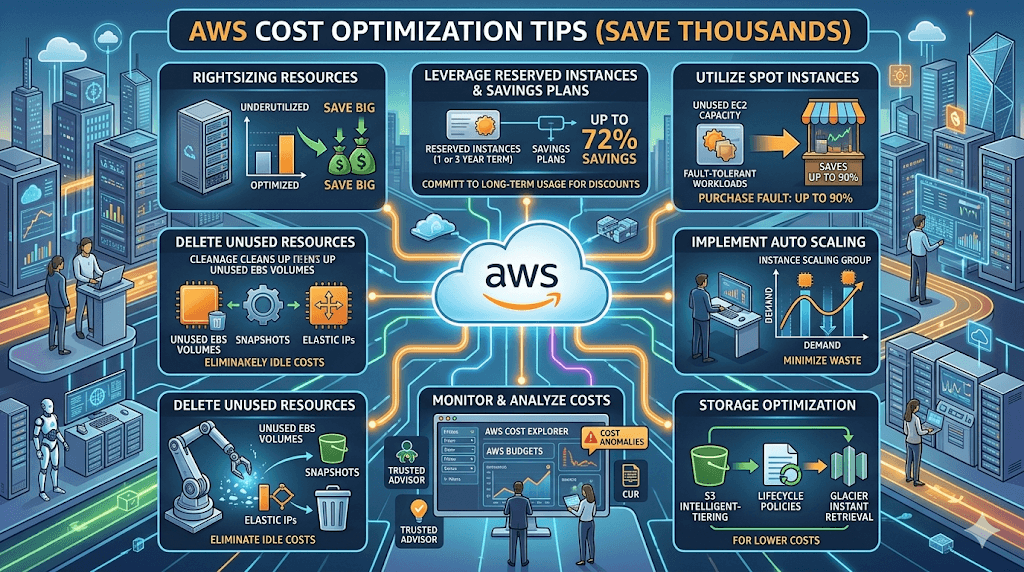
Cloud computing is powerful — but it can also become expensive very quickly if not managed properly.
Many companies move to AWS expecting to save money… and then suddenly face unexpected cloud bills. The good news? With the right AWS cost optimization strategies, you can reduce your cloud costs by 20%–70% without sacrificing performance.
In this guide, you’ll discover practical AWS cost optimization tips used by startups, developers, and enterprises to save thousands of dollars every year.
Hey there, fellow cloud explorer! 👋 If you’ve ever opened your AWS billing dashboard and felt that familiar stomach drop—“Wait, how is it this high?!”—you’re not alone. I’ve been there myself (and helped plenty of startups and small teams claw back thousands from surprise bills). The good news? AWS cost optimization isn’t rocket science, and in 2026 it’s easier than ever with tools like the Cost Optimization Hub, Compute Optimizer, and flexible Savings Plans.
In this post, I’m sharing the exact, battle-tested tips that have helped real teams slash their AWS spend by 30–70% while keeping performance rock-solid. No fluff, no jargon overload—just practical steps you can start today. Whether you’re a solo founder, a DevOps pro, or running a growing business, these strategies will feel like a breath of fresh air.
Let’s turn that monthly AWS invoice from a heart-stopper into a high-five moment. Ready? Let’s dive in.

Why AWS Costs Get Expensive
Before optimizing, it’s important to understand why AWS costs increase:
- Running unused EC2 instances
- Over-provisioned resources
- Not using Reserved Instances
- Data transfer charges
- Storage mismanagement
- Idle load balancers
- Forgotten test environments
These small inefficiencies can silently drain your budget every month.
Let’s fix that.
15 AWS Cost Optimization Tips That Actually Work
1. Use AWS Cost Explorer
Start by understanding your spending.
AWS Cost Explorer helps you:
- Track spending trends
- Identify expensive services
- Forecast future costs
- Spot anomalies
Pro Tip:
Set up daily cost alerts to avoid surprise bills.
2. Shut Down Idle EC2 Instances
One of the biggest cost killers is unused EC2 instances.
You should:
- Stop dev/test instances after working hours
- Delete unused instances
- Use automation to schedule shutdowns
Potential Savings:
Companies save 30–40% just by shutting down idle resources.
3. Use Reserved Instances (Save Up to 75%)
If you’re running workloads long-term:
Use:
- Reserved Instances (RI)
- Savings Plans
Benefits:
- Lower hourly rates
- Predictable costs
- Huge discounts
Savings Example:
- On-demand EC2: $1000/month
- Reserved Instance: $300–$400/month
4. Use Spot Instances for Huge Discounts
Spot Instances can save up to 90%.
Best for:
- Batch processing
- Data analytics
- Testing environments
- CI/CD workloads
Spot Instances are perfect if your workload can handle interruptions.
5. Right-Size Your EC2 Instances
Many teams overestimate resources.
Example:
- Using t3.large when t3.medium is enough
Use:
- AWS Compute Optimizer
- CloudWatch metrics
This alone can reduce costs by 20–30%.
6. Use Auto Scaling
Auto Scaling ensures you only pay for what you use.
Benefits:
- Scale up during traffic spikes
- Scale down during low usage
- Reduce waste
This is one of the most effective cost-saving strategies.
7. Delete Unused EBS Volumes
Many people forget this one.
Unused:
- EBS volumes
- Snapshots
- AMIs
These continue to cost money.
Run regular cleanup checks.
8. Use S3 Storage Classes
Not all data needs high-performance storage.
Use:
- S3 Standard (frequent access)
- S3 Intelligent-Tiering
- S3 Glacier (archive)
This can reduce storage costs by 80%.
9. Enable S3 Lifecycle Policies
Automatically move data to cheaper storage.
Example:
- Move files to Glacier after 30 days
- Delete logs after 90 days
This keeps your storage clean and cheap.
10. Monitor Data Transfer Costs
Data transfer charges can be surprisingly high.
Tips:
- Use CloudFront CDN
- Keep resources in the same region
- Minimize cross-region traffic
11. Use AWS Savings Plans
Savings Plans provide flexible cost savings.
Best for:
- Long-term workloads
- Predictable usage
Savings:
- Up to 72% discount
12. Use Serverless When Possible
Serverless services like:
- AWS Lambda
- API Gateway
- DynamoDB
You only pay for usage.
No idle costs.
Perfect for:
- Startups
- Small apps
- APIs
13. Use Graviton Instances
AWS Graviton instances are:
- Cheaper
- Faster
- More efficient
Savings:
- Up to 40% cheaper than traditional instances
14. Use AWS Budgets & Alerts
Avoid surprise bills.
Set:
- Budget alerts
- Usage alerts
- Forecast alerts
This helps you stay within budget.
15. Clean Up Old Resources Regularly
Old resources pile up quickly:
- Load balancers
- Snapshots
- Elastic IPs
- Test environments
Schedule monthly cleanups.
Real-World Example: How Companies Save Thousands
Example Startup:
Before Optimization:
- EC2: $1200/month
- Storage: $400/month
- Data transfer: $300/month
After Optimization:
- EC2: $600/month
- Storage: $150/month
- Data transfer: $120/month
Total Savings: $1030/month
Yearly Savings: $12,360
AWS Cost Optimization Checklist
Use this quick checklist:
✔ Stop unused EC2 instances
✔ Use Reserved Instances
✔ Use Spot Instances
✔ Enable Auto Scaling
✔ Right-size instances
✔ Clean unused storage
✔ Use S3 lifecycle policies
✔ Monitor data transfer
✔ Enable budget alerts
✔ Use serverless
Best AWS Cost Optimization Tools
Here are the best tools:
- AWS Cost Explorer
- AWS Budgets
- AWS Trusted Advisor
- AWS Compute Optimizer
- CloudWatch
- AWS Pricing Calculator
Pro Tips from AWS Experts
- Always tag resources
- Monitor costs weekly
- Automate shutdowns
- Use multi-account billing
- Optimize monthly
Common AWS Cost Mistakes to Avoid
Avoid these mistakes:
- Leaving instances running
- Not using Reserved Instances
- Ignoring storage costs
- Not monitoring billing
- Over-provisioning resources
Final Thoughts
AWS is incredibly powerful — but cost optimization is essential.
By following these AWS cost optimization tips:
You can:
- Save thousands of dollars
- Improve efficiency
- Reduce waste
- Scale smarter
Start with small changes, and you’ll quickly see big savings.
FAQs :
How can I reduce AWS costs quickly?
Stop unused instances, use Reserved Instances, and right-size resources.
What is the biggest AWS cost saver?
Reserved Instances and Savings Plans usually provide the biggest savings.
How often should I optimize AWS costs?
Monthly reviews are recommended.
Is AWS cheaper than traditional hosting?
Yes — if optimized properly.
What is AWS Cost Explorer?
A tool to analyze and monitor AWS spending.
Final Thought: Optimization Is Freedom
Saving thousands on AWS isn’t just about the money — it’s about giving your team (and your bank account) room to breathe. That extra cash can fund new features, hires, or even that well-deserved team offsite.
Start small. Pick one tip from this list today. You’ve got this.
What’s your biggest AWS cost headache right now? Drop it in the comments — I read every single one and love helping out. If this post saved you even a few bucks, share it with a fellow cloud warrior.
P.S. Bookmark this page and come back next quarter — cloud costs evolve, and so do the best tricks. For more inspiring tech stories, growth hacks, and money-saving wins, subscribe to Inspireviraltimes.com and never miss an update.
You’re now officially armed to fight cloud waste. Go make that next bill smile instead of scream. 🚀
Last updated: April 2026

