
Artificial Intelligence is transforming how businesses operate, automate processes, and interact with customers. But here’s a challenge many organizations face:
How do you build powerful AI applications without spending months managing complex machine learning infrastructure?
This is exactly where Amazon Bedrock comes in.
Imagine launching a ChatGPT-like application, creating an intelligent customer support chatbot, or building an enterprise knowledge assistant—all without training large language models from scratch.
That’s the promise of AWS Bedrock AI.
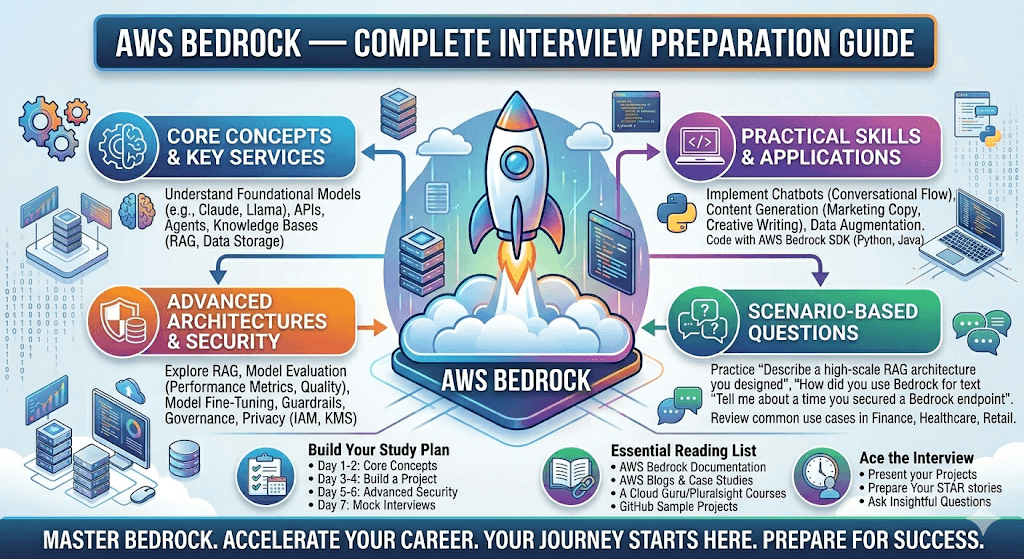
In this guide, you’ll learn everything you need to know about AWS Bedrock, including its architecture, benefits, use cases, pricing, and how to get started.
What is AWS Bedrock?
Amazon Bedrock is a fully managed Generative AI service from Amazon Web Services that allows developers to build and scale AI applications using foundation models (FMs) through APIs.
Instead of training massive AI models yourself, Bedrock provides access to industry-leading foundation models from multiple AI providers through a single interface.
With Bedrock, you can:
- Build AI chatbots
- Create content generation tools
- Develop AI-powered search systems
- Generate images
- Build Retrieval-Augmented Generation (RAG) applications
- Automate business workflows
All without managing servers, GPUs, or machine learning infrastructure.
Why AWS Bedrock Matters
Before Bedrock, organizations typically had two options:
Option 1: Train Their Own Models
Challenges:
- Expensive GPUs
- Large datasets
- Months of training time
- Specialized AI expertise
Option 2: Use External AI APIs
Challenges:
- Security concerns
- Data governance issues
- Vendor lock-in
- Limited customization
AWS Bedrock solves these challenges by providing:
✅ Enterprise security
✅ Managed infrastructure
✅ Multiple AI model choices
✅ Easy integration with AWS services
✅ Private data protection
How AWS Bedrock Works
High-Level Architecture
User/Application
        │
        ▼
   AWS Bedrock API
        │
 ┌──────┼─────────┐
 │      │         │
 ▼      ▼         ▼
Claude  Llama   Titan
Models  Models  Models
        │
        ▼
 Generated Response
Developers send prompts through the Bedrock API.
The selected foundation model processes the request and returns the generated response.
AWS handles:
- Infrastructure
- Scaling
- Security
- Monitoring
- Availability
Foundation Models Available in AWS Bedrock
One of Bedrock’s biggest advantages is access to multiple AI models.
Amazon Titan Models
Developed by AWS.
Capabilities:
- Text generation
- Embeddings
- Summarization
- Knowledge retrieval
Best for:
- Enterprise applications
- AWS-native solutions
Claude Models
Created by Anthropic.
Known for:
- Long context windows
- High-quality reasoning
- Enterprise AI assistants
- Content generation
Popular for:
- Customer service bots
- Knowledge assistants
- AI copilots
Llama Models
Created by Meta.
Ideal for:
- Open AI development
- Cost-effective deployments
- Fine-tuning flexibility
Mistral Models
Created by Mistral AI.
Advantages:
- Fast inference
- Strong multilingual support
- Efficient processing
Key Features of AWS Bedrock
1. Serverless AI Infrastructure
No need to manage:
- GPUs
- Clusters
- Kubernetes
- ML infrastructure
AWS automatically scales based on demand.
2. Retrieval-Augmented Generation (RAG)
RAG allows AI models to answer questions using your organization’s private data.
Example:
A healthcare company can connect:
- PDFs
- Policies
- Databases
- Internal documentation
The AI assistant can provide accurate responses based on company knowledge.
3. Knowledge Bases
AWS Bedrock Knowledge Bases simplify RAG implementation.
Supported sources:
- Amazon S3
- Confluence
- Salesforce
- SharePoint
- Custom repositories
Benefits:
- Faster implementation
- Better response accuracy
- Reduced hallucinations
4. Guardrails
AI safety is critical.
Bedrock Guardrails help:
- Block harmful content
- Prevent sensitive data exposure
- Enforce compliance policies
- Filter inappropriate responses
5. Model Customization
Organizations can customize models using:
Fine-Tuning
Train models on company-specific data.
Continued Pretraining
Improve model knowledge in specific domains.
Examples:
- Healthcare
- Finance
- Legal
- Insurance
Real-World AWS Bedrock Use Cases
Intelligent Customer Support
A global retailer uses Bedrock to create AI-powered customer support.
Benefits:
- 24/7 support
- Reduced operational costs
- Faster response times
- Improved customer satisfaction
Enterprise Knowledge Assistant
Employees can ask:
- HR policy questions
- Technical documentation queries
- Compliance requirements
The assistant retrieves answers from internal knowledge bases.
Automated Content Creation
Marketing teams use Bedrock to generate:
- Blog posts
- Product descriptions
- Email campaigns
- Social media content
Healthcare Applications
Healthcare organizations use Bedrock for:
- Medical document summarization
- Clinical research assistance
- Patient support automation
While maintaining strict security and compliance requirements.
Financial Services
Banks use Bedrock for:
- Risk analysis
- Fraud detection support
- Customer onboarding assistance
- Investment research summaries
AWS Bedrock and RAG Architecture
One of the most common interview and production use cases is RAG.
Example Workflow
User Question
      │
      ▼
Bedrock Knowledge Base
      │
      ▼
Vector Search
      │
      ▼
Relevant Documents
      │
      ▼
Foundation Model
      │
      ▼
AI Generated Response
Benefits:
- Accurate answers
- Reduced hallucinations
- Real-time information access
- Enterprise data integration
How to Get Started with AWS Bedrock
Step 1: Create AWS Account
Sign in to your AWS Management Console.
Step 2: Enable Bedrock
Navigate to:
AWS Console
→ Amazon Bedrock
→ Model Access
Request access to foundation models.
Step 3: Choose a Model
Popular beginner choices:
- Claude
- Titan
- Llama
Step 4: Test Prompts
Use Bedrock Playground.
Example Prompt:
Explain cloud computing in simple terms.Evaluate responses.
Step 5: Build an Application
Integrate Bedrock using:
- Python
- Java
- Node.js
- .NET
Example use cases:
- Chatbots
- Search assistants
- Content generators
AWS Bedrock Pricing Overview
Bedrock follows a pay-as-you-go pricing model.
You typically pay for:
- Input tokens
- Output tokens
- Model usage
- Knowledge Base processing
Pricing varies depending on:
- Selected model
- Region
- Token volume
This makes Bedrock attractive because organizations avoid massive upfront infrastructure investments.
AWS Bedrock vs OpenAI
| Feature | AWS Bedrock | OpenAI API |
|---|---|---|
| Multiple Models | Yes | Limited |
| AWS Integration | Excellent | Moderate |
| Enterprise Security | Strong | Strong |
| Knowledge Bases | Native | Requires setup |
| Serverless Deployment | Yes | Yes |
| Compliance Features | Extensive | Moderate |
Best Practices for AWS Bedrock
Optimize Prompts
Provide:
- Context
- Clear instructions
- Expected format
Implement RAG
Avoid relying solely on model memory.
Use:
- Knowledge Bases
- Vector Databases
- Internal Documents
Enable Guardrails
Protect applications from:
- Toxic outputs
- Sensitive information leakage
- Compliance violations
Monitor Costs
Track:
- Token consumption
- API requests
- User activity
Frequently Asked Questions (FAQs)
Is AWS Bedrock the same as ChatGPT?
No. Bedrock is a platform that provides access to multiple foundation models, while ChatGPT is an application built on OpenAI models.
Do I need machine learning expertise to use Bedrock?
No. Developers can build AI applications using APIs without deep ML knowledge.
Does AWS Bedrock support RAG?
Yes. Bedrock provides native support through Knowledge Bases and vector search integration.
Can I use my company’s private data?
Yes. Bedrock supports secure integration with enterprise data sources.
Is AWS Bedrock suitable for enterprises?
Absolutely. It includes enterprise-grade security, compliance, governance, and scalability features.
Key Takeaways
- AWS Bedrock is a fully managed Generative AI service.
- It provides access to multiple foundation models through one API.
- No infrastructure management is required.
- Supports RAG, Knowledge Bases, Guardrails, and model customization.
- Ideal for chatbots, content generation, enterprise search, and AI assistants.
- Integrates seamlessly with AWS services.
- Enables organizations to accelerate AI adoption securely and cost-effectively.
Conclusion
Generative AI is no longer limited to large technology companies with massive machine learning teams. With AWS Bedrock, businesses of all sizes can build intelligent AI applications quickly, securely, and at scale.
Whether you’re a developer creating your first AI chatbot, a startup building a next-generation product, or an enterprise implementing a company-wide AI assistant, AWS Bedrock provides the tools needed to move from idea to production faster than ever before.
The future of AI development is not about managing infrastructure—it’s about delivering business value. AWS Bedrock helps you focus on innovation while AWS handles the complexity behind the scenes.
Ready to start your Generative AI journey? Explore AWS Bedrock today and begin building intelligent applications that transform how your organization works.

