
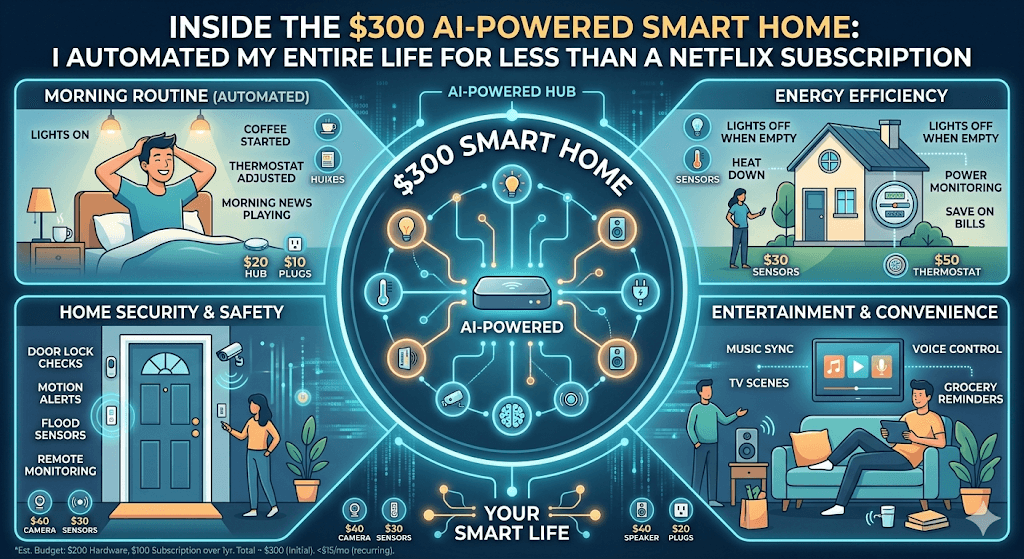
Inside the $300 AI-Powered Smart Home: I Automated My Entire Life for Less Than a Netflix Subscription
Netflix just hiked its prices again — the standard plan now runs $19.99/month. Meanwhile, my entire smart home costs me roughly $25/month when I spread the upfront investment over a year. Here’s how I pulled it off, what surprised me, and why 2026 is the year the “budget smart home” stopped being a compromise.
Let me be honest with you. I didn’t set out to build a smart home. I set out to stop burning money on electricity while my apartment sat empty eight hours a day. What I ended up with is a home that wakes up before I do, locks the door when I forget, turns off every light when I fall asleep on the couch, and — I’m not exaggerating — has shaved about 22% off my monthly electric bill.
Total upfront cost? $297.
That’s not a typo. And no, I didn’t sacrifice quality. The secret isn’t some magical discount code. It’s that the smart home industry has reached a tipping point in 2026 where competition, the Matter protocol, and AI-enhanced voice assistants have driven prices to the floor while pushing quality up. The same setup would have cost me $800+ three years ago. Today, it’s less than a decent pair of sneakers.
Wait — What Does “Less Than Netflix” Actually Mean?
Let me do the math so the headline isn’t just clickbait. Netflix’s ad-free standard plan costs $19.99/month as of March 2026. My entire smart home setup cost $297 upfront, with zero ongoing subscriptions (I deliberately avoided any device that requires a cloud plan to function). Spread that $297 across twelve months, and you’re looking at $24.75/month — or about $4.76 more than Netflix. But here’s the twist: the energy savings from my smart thermostat and automated lighting have been averaging about $30-35/month. So net-net, the smart home is actually paying me back.
After the first year, the monthly cost drops to essentially zero — just the electricity to run the devices, which is negligible. Netflix, on the other hand, will probably cost $22 by then if their recent pricing trajectory holds.
The Exact Shopping List (Every Dollar Accounted For)
I spent weeks researching before I bought a single thing. The goal was simple: automate lighting, climate, security, and daily routines — no subscriptions, no proprietary lock-in, and everything had to support Matter so I could mix and match brands without losing my mind.
A few notes on this list. The Echo Dot was on sale (they regularly hit $25-30), and the Wyze bulbs are genuinely excellent at $9 a pop. The real MVP is the SwitchBot Hub Mini — it lets me control my “dumb” TV, air conditioner, and fan using IR signals through voice commands, which means I didn’t have to replace a single appliance.
The Setup: Surprisingly Painless
I won’t pretend that setting everything up was a five-minute affair. It took me about three hours on a Saturday afternoon, most of which was spent waiting for firmware updates. But here’s what surprised me: nothing crashed. Nothing was incompatible. Everything just… worked.
That’s the Matter protocol doing its job. For years, the smart home world was a mess of competing ecosystems — Zigbee, Z-Wave, Wi-Fi, Bluetooth, proprietary garbage. You needed a PhD in network engineering to get a light bulb to talk to a thermostat. In 2026, Matter has matured enough that you can genuinely buy devices from four different brands and have them cooperate on the same network without a dedicated hub for each one.
I set up the Echo Dot as my central hub, connected every device through the Alexa app, and then spent the next hour creating routines. That’s where the magic really happens.
My Daily Routines (The Part That Changed Everything)
Hardware is just hardware until you automate it. Here’s what a typical day looks like in my apartment now:
6:15 AM — “Good Morning” routine kicks in. The bedroom light fades on gradually over ten minutes, simulating a sunrise. The thermostat bumps up two degrees. The coffee maker (plugged into a smart plug) turns on. By the time I’m actually conscious, there’s coffee waiting. I never set an alarm anymore. The light does it.
7:30 AM — I walk out the door. The motion sensor notices no movement for five minutes. Lights off. Thermostat drops to eco mode. The smart plug kills the coffee maker. The security camera arms itself. I didn’t touch a single button.
5:45 PM — I come home. The door sensor triggers the “Welcome Home” routine. Lights on in the hallway and kitchen. Thermostat returns to my preferred temperature. The TV turns on to my usual streaming app (IR blaster doing its thing). By the time I’ve kicked off my shoes, the apartment already feels lived-in.
11:00 PM — “Goodnight” routine. Every light in the apartment turns off. Every smart plug powers down. Door sensors confirm all entry points are closed. Thermostat drops for sleeping. The camera’s night mode activates. I say “Alexa, goodnight” from bed, and the entire apartment shuts itself down in about three seconds.
The AI Angle: Why 2026 Is Different
You might be thinking: “People have been automating lights with smart plugs since 2015. What’s new?” Fair question. The answer is the AI layer that now sits on top of these devices.
Amazon’s Alexa has gotten meaningfully smarter this year. You can speak to it in natural sentences now instead of memorizing rigid command structures. I can say “Alexa, it’s kind of chilly in here” and it’ll bump the thermostat up two degrees. Or “Alexa, I’m heading to bed early tonight” and it’ll run my goodnight routine on the spot, even though it’s 9 PM instead of 11. It’s context-aware in a way that feels less like talking to a command line and more like talking to a reasonably attentive roommate.
The energy management side is where AI genuinely shines. My smart thermostat doesn’t just follow a schedule — it learns patterns. After about two weeks, it figured out that I come home later on Wednesdays (I have a standing dinner with friends) and stopped pre-heating the apartment for 5:45 PM on that day. I never told it to do this. It just noticed the pattern and adapted. That kind of micro-optimization is what drives real energy savings over time.
What I Spent Zero Dollars On (And Why That Matters)
I want to highlight what’s not on my shopping list, because the absence is just as important as the purchases.
I spent nothing on monthly subscriptions. The Wyze camera records locally to a microSD card, so I don’t need cloud storage. The Aqara sensors work locally through the Echo. None of my devices require a paid app tier to function. This was non-negotiable for me. A “budget” smart home that costs $15/month in subscriptions is a $180/year tax that most people forget to count.
I also spent nothing on a dedicated smart home hub. The Echo Dot supports Matter and Zigbee natively, so it doubles as both my voice assistant and my hub. Five years ago, you needed a Samsung SmartThings hub, a Philips Hue bridge, and probably a separate Zigbee stick. Now? A $28 hockey puck on my nightstand does it all.
I didn’t buy a smart lock, either. Not because they aren’t useful — they absolutely are — but because my apartment’s deadbolt doesn’t accommodate one without landlord permission. That’s a $50-80 addition I’d make in a heartbeat if I owned the place. If you own your home, add one to this list. It’s worth it.
Honest Downsides (Because Nothing Is Perfect)
I’d be doing you a disservice if I pretended this was flawless. Here’s where reality fell short of the dream:
Wi-Fi strain is real. I added twelve smart devices to a network that already had a laptop, a phone, a tablet, and a gaming console. My ISP-provided router started choking. I ended up putting all the smart devices on the 2.4 GHz band and keeping my personal devices on 5 GHz. If you have an older router, budget an extra $40-60 for a decent one. Most budget smart devices only support 2.4 GHz anyway.
Voice recognition still fumbles. Alexa mishears me about once a day, usually in ways that are annoying rather than catastrophic. “Turn off the bedroom light” occasionally becomes “turn off the bathroom light.” I’ve learned to name my rooms in ways that sound as different as possible.
Initial setup requires patience. Firmware updates, app registrations, naming conventions, routine logic — it’s not hard, but it’s fiddly. If you’re the kind of person who gives up on IKEA furniture halfway through, budget extra patience. Once it’s set up, though, you rarely touch it again.
Privacy is a legitimate concern. I have a microphone (Echo) and a camera in my apartment, both connected to the internet. I’m comfortable with the trade-off, but I understand why some people aren’t. The camera only activates when I’m away, and I’ve disabled the Echo’s always-listening feature when I have guests over. But if you’re deeply privacy-conscious, you might want to look into local-only systems like Hubitat or Home Assistant — they’re more work to set up but keep your data off the cloud entirely.
Six Months In: What I’d Do Differently
If I could start over, I’d change three things. First, I’d buy the Aqara sensors from the start instead of trying cheaper no-name alternatives (I wasted $18 on sensors that disconnected constantly before switching). Second, I’d set up a dedicated IoT network on my router from day one instead of troubleshooting Wi-Fi congestion two weeks in. And third, I’d skip the “automate everything at once” impulse and start with just lighting and one routine. Build the habit, then expand. The incremental approach is genuinely better than the big-bang approach, even if it feels less exciting.
The Bottom Line: Is It Worth It?
Here’s my honest assessment after six months. The smart home didn’t revolutionize my life. It didn’t make me a different person. What it did was remove about fifteen small daily annoyances — the light I forgot to turn off, the thermostat I forgot to adjust, the coffee I forgot to start — and replace them with a home that just handles things quietly in the background.
The energy savings are real and measurable. The convenience is genuine but subtle. And the upfront cost is low enough that even if you decide it’s not for you after six months, you’ve spent less than you would have on a year of premium streaming.
We’re at a point in 2026 where building a smart home isn’t a luxury hobby for tech enthusiasts. It’s a practical, affordable upgrade that pays for itself. For $297 and a Saturday afternoon, I got a home that takes care of itself. That’s a trade I’d make again in a heartbeat.
Found this helpful?
Share it with someone who’s been meaning to build a smart home but keeps putting it off.
Share This Post
