
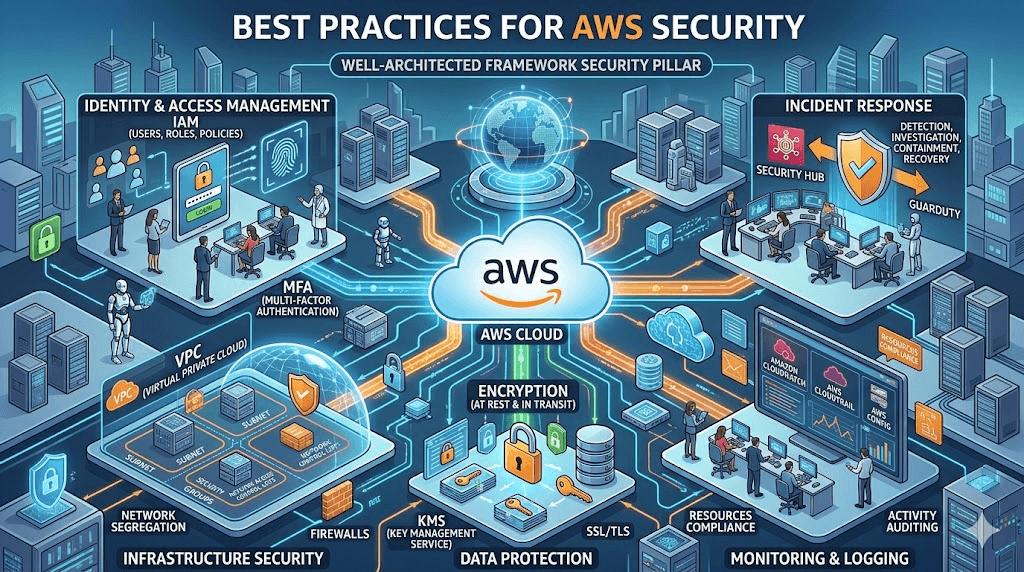
Best Practices for AWS Security
Cloud computing has transformed how businesses build, deploy, and scale applications. But with great power comes great responsibility — especially when it comes to security.
If you’re using Amazon Web Services (AWS), you’re already benefiting from one of the most secure cloud platforms in the world. However, AWS security is a shared responsibility, meaning AWS secures the infrastructure, while you must secure your applications, data, and configurations.
In this guide, you’ll learn best practices for AWS security that every developer, startup, and enterprise should follow in 2026.
🔐 Understanding AWS Shared Responsibility Model
Before diving into best practices, it’s important to understand how AWS security works.
AWS is responsible for:
- Physical data center security
- Hardware and infrastructure
- Networking infrastructure
- Global cloud availability
You are responsible for:
- Data security
- IAM roles and permissions
- Application security
- OS patching (for EC2)
- Network configuration
This is known as the Shared Responsibility Model, and it’s the foundation of AWS security.
🛡️ 1. Use IAM Properly (Identity and Access Management)
AWS Identity and Access Management (IAM) is the first line of defense in AWS security.
Best Practices
✔ Use least privilege principle
✔ Avoid using root account
✔ Create roles instead of users when possible
✔ Rotate credentials regularly
✔ Enable MFA (Multi-Factor Authentication)
Example
Bad Practice:
- Giving full admin access to every developer
Good Practice:
- Assigning role-based access like:
- Developer Role
- Read-only Role
- Admin Role
Pro Tip: Never share access keys in code repositories.
🔐 2. Enable Multi-Factor Authentication (MFA)
Multi-factor authentication adds an extra layer of protection to your AWS account.
Why MFA is Important
Even if someone steals your password:
- They still can’t access your account
- Your infrastructure stays protected
Enable MFA For:
- Root account (Mandatory)
- Admin users
- Sensitive operations
Use apps like:
- Google Authenticator
- Microsoft Authenticator
- Hardware Security Keys
🌐 3. Secure Your Network with VPC
Amazon Virtual Private Cloud (VPC) helps isolate your infrastructure.
VPC Security Best Practices
✔ Use private subnets for databases
✔ Use public subnets only for load balancers
✔ Restrict inbound traffic
✔ Use NAT Gateway for outbound traffic
Example Architecture
Public Subnet:
- Load Balancer
- Bastion Host
Private Subnet:
- Application Servers
- Database Servers
This architecture dramatically reduces attack surface.
🔒 4. Use Security Groups and NACLs Wisely
Security Groups act like virtual firewalls.
Best Practices
✔ Allow only required ports
✔ Avoid 0.0.0.0/0 (open to world)
✔ Use separate security groups per service
✔ Regularly audit rules
Example:
Instead of:
Allow All Traffic
Use:
Allow Port 443 (HTTPS only)
🗝️ 5. Encrypt Everything (At Rest & In Transit)
Encryption is non-negotiable in modern cloud security.
Use:
- AWS Key Management Service (KMS)
- SSL/TLS certificates
- S3 encryption
Encrypt:
✔ S3 Buckets
✔ EBS Volumes
✔ Databases
✔ Backups
Pro Tip:
Enable default encryption wherever possible.
📊 6. Enable AWS CloudTrail Logging
AWS CloudTrail records all actions in your AWS account.
Why It’s Important
You can:
- Track suspicious activity
- Audit access
- Investigate security incidents
Best Practices:
✔ Enable CloudTrail in all regions
✔ Store logs in secure S3 bucket
✔ Enable log file validation
🚨 7. Use AWS Security Monitoring Tools
AWS offers powerful built-in security tools:
Must-Use AWS Security Tools
- Amazon GuardDuty — Threat detection
- AWS Security Hub — Centralized security dashboard
- Amazon Inspector — Vulnerability scanning
- AWS Config — Configuration monitoring
Using these tools together gives enterprise-grade protection.
🔄 8. Regularly Patch and Update Systems
If you’re using:
- EC2 instances
- Containers
- Custom OS
You must update them regularly.
Best Practices
✔ Enable automatic patching
✔ Use managed services when possible
✔ Remove unused services
Managed services like:
- RDS
- Lambda
- DynamoDB
Reduce security risks significantly.
📁 9. Secure S3 Buckets
Misconfigured S3 buckets are one of the biggest AWS security risks.
S3 Security Checklist
✔ Block public access
✔ Use bucket policies
✔ Enable versioning
✔ Enable encryption
✔ Use lifecycle rules
🧠 10. Follow Principle of Least Privilege
Only give access to what is absolutely necessary.
Example:
Instead of:
AmazonS3FullAccess
Use:
AmazonS3ReadOnlyAccess
This reduces damage if credentials are compromised.
🔐 11. Rotate Credentials Regularly
Best Practices:
✔ Rotate access keys every 90 days
✔ Use temporary credentials
✔ Avoid long-term keys
Use:
- IAM roles
- STS tokens
☁️ 12. Use Managed Services When Possible
Managed services reduce security responsibility.
Better Choices:
Instead of EC2 → Use Lambda
Instead of self DB → Use RDS
Instead of Redis server → Use ElastiCache
Managed services:
- Handle patching
- Handle scaling
- Improve security
🚀 AWS Security Checklist (Quick Summary)
✔ Enable MFA
✔ Use IAM roles
✔ Encrypt data
✔ Enable CloudTrail
✔ Use VPC security
✔ Monitor logs
✔ Patch systems
✔ Secure S3 buckets
✔ Rotate credentials
✔ Use managed services
Important Thoughts
AWS provides powerful security tools — but security depends on how you configure them.
By following these AWS security best practices, you can:
✅ Protect your infrastructure
✅ Prevent cyber attacks
✅ Avoid data breaches
✅ Build customer trust
In 2026, cloud security isn’t optional — it’s essential.
FAQ (SEO Boost Section)
Is AWS secure by default?
Yes, AWS infrastructure is secure, but you must configure your services properly.
What is the biggest AWS security risk?
Misconfigured IAM permissions and public S3 buckets.
Should I enable MFA for AWS?
Yes, especially for root and admin users.
What AWS service helps detect threats?
Amazon GuardDuty is widely used for threat detection.
How often should I audit AWS security?
At least once per month.
About InspireViralTimes
At InspireViralTimes.com, we publish trending tech, cloud computing, AI, and cybersecurity content to help you stay ahead in the digital world.

