
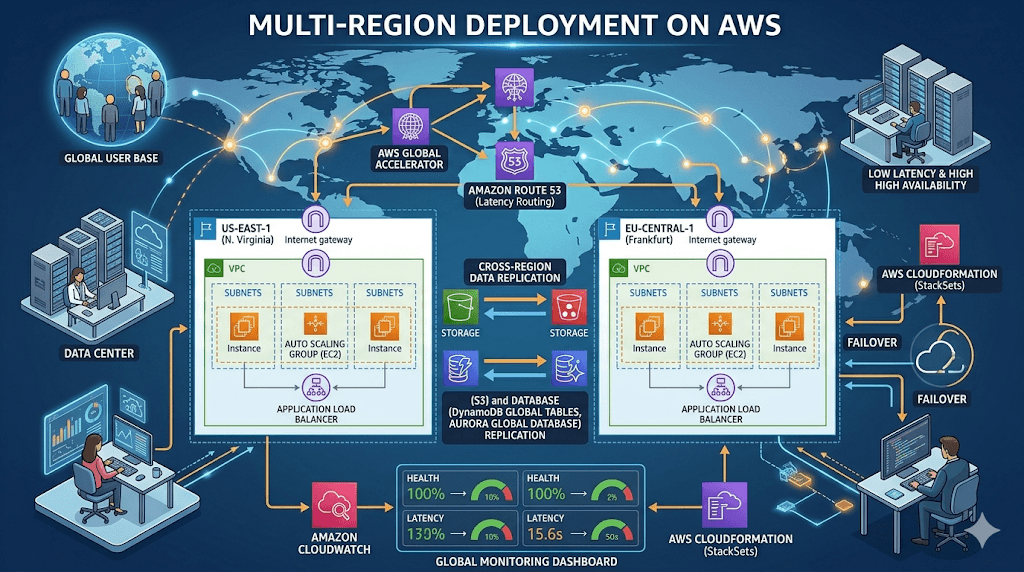
Multi-Region Deployment on AWS
In today’s always-online world, downtime is not just inconvenient — it’s expensive. Whether you’re running a startup, SaaS product, blog, or enterprise platform, users expect your website or application to be fast, reliable, and available 24/7.
This is where Multi-Region Deployment on AWS becomes a game-changer.
In this guide, you’ll learn:
- What Multi-Region Deployment is
- Why it matters in 2026
- When to use it
- Architecture patterns
- Best AWS services for multi-region setups
- Real-world examples
- Step-by-step deployment strategy
- Cost optimization tips
Let’s dive in.
What is Multi-Region Deployment on AWS?
Multi-Region Deployment means running your application in multiple AWS regions instead of just one.
In simple terms, it means running your application across multiple AWS Regions (think us-east-1 in Virginia, eu-west-1 in Ireland, ap-southeast-1 in Singapore) instead of putting all your eggs in one geographic basket.
AWS Regions are isolated data centers spread across the globe. A single-region setup is great for starters (and you should always start with multi-AZ within one region for high availability). But multi-region takes it further: your app can automatically route traffic, replicate data, and failover seamlessly if one region has issues—like a power outage, network glitch, or even a full-blown disaster.
It’s not about complexity for complexity’s sake. It’s about building apps that feel global from day one.
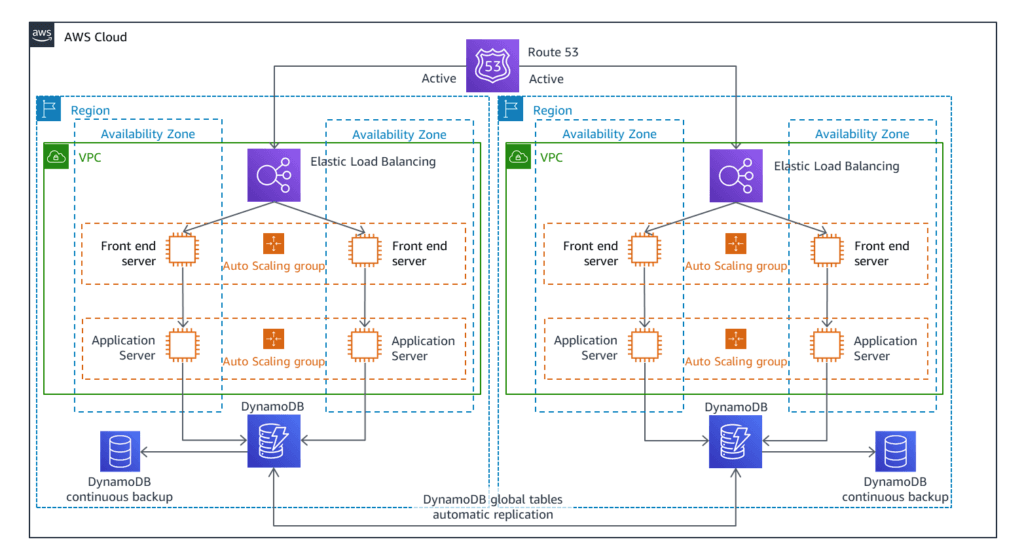
For example:
- Primary Region: US East (N. Virginia)
- Secondary Region: Europe (Ireland)
- Backup Region: Asia Pacific (Singapore)
If one region fails, traffic automatically shifts to another region, ensuring your application stays online.
Think of it like having multiple backup generators for your website — if one fails, another takes over instantly.
Why Multi-Region Deployment Matters in 2026
Today’s users expect:
- Instant loading speed
- Zero downtime
- Global accessibility
- High reliability
Multi-region deployment helps you achieve all of this.
Key Benefits
1. High Availability
If one AWS region goes down, your application remains available.
2. Disaster Recovery
Natural disasters, outages, or failures won’t bring your service down.
3. Faster Global Performance
Users connect to the closest AWS region, reducing latency.
4. Business Continuity
Your business keeps running even during outages.
5. Better User Experience
Lower latency = happier users.
When Should You Use Multi-Region Deployment?
Multi-Region deployment is ideal if:
- You have global users
- Your website needs 99.99% uptime
- You’re running SaaS or APIs
- You handle payments or transactions
- You’re scaling quickly
- You want enterprise-level reliability
Even mid-size businesses now use multi-region setups in 2026.
AWS Regions and Availability Zones (Quick Overview)
Before moving forward, it’s important to understand:
AWS Region
A geographical area (e.g., US East, Europe, Asia)
Availability Zone
Multiple data centers inside a region
Best practice:
- Use Multi-AZ within a region
- Use Multi-Region for global resilience
Multi-AZ protects against data center failure
Multi-Region protects against regional failure
Multi-Region Deployment Architecture Patterns
There are four common multi-region deployment strategies:This is where the rubber meets the road. AWS gives you two main patterns—choose based on your needs, budget, and risk tolerance.
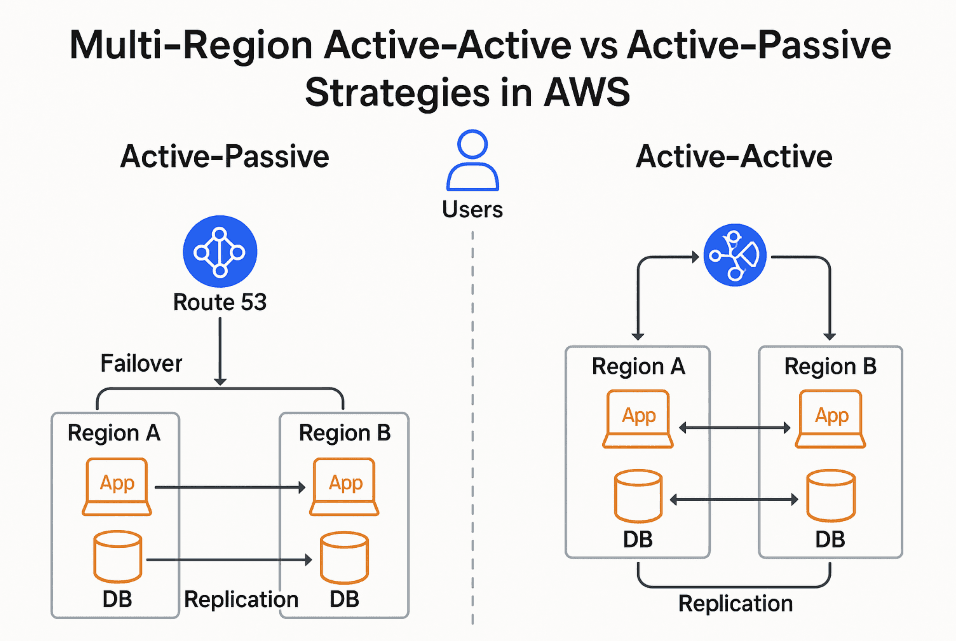
1. Active-Passive (Most Popular)
How it works:
- One region is active
- Another region is standby
- Failover happens automatically
Best For
- Startups
- Blogs
- SaaS apps
- Cost-conscious deployments
Benefits
- Lower cost
- Easy setup
- Reliable disaster recovery
2. Active-Active Deployment
How it works:
- Multiple regions handle traffic simultaneously
- Load is distributed globally
Best For
- Global applications
- High traffic platforms
- Enterprise apps
Benefits
- Maximum performance
- No downtime
- Better scalability
3. Pilot Light Deployment
How it works:
- Minimal infrastructure in backup region
- Scales only when needed
Best For
- Budget-friendly disaster recovery
- Medium-traffic apps
4. Warm Standby
How it works:
- Smaller version of production environment
- Ready to scale instantly
Best For
- Mission-critical apps
- Faster failover needs
Best AWS Services for Multi-Region Deployment
Here are the most important AWS services:
1. Amazon Route 53
Used for:
- DNS routing
- Health checks
- Failover routing
- Latency-based routing
Route 53 automatically directs users to the best region.
2. AWS Global Accelerator
Provides:
- Faster global performance
- Automatic failover
- Static IP addresses
Great for global applications.
3. Amazon CloudFront
Benefits:
- CDN for faster content delivery
- Edge locations worldwide
- Reduced latency
Perfect for:
- Websites
- APIs
- Static content
4. Amazon S3 Cross-Region Replication
Use for:
- Backup storage
- Disaster recovery
- Data replication
Your files stay synced across regions.
5. Amazon RDS Multi-Region
Options:
- Read replicas
- Global database
- Cross-region backups
Ideal for:
- High availability databases
6. DynamoDB Global Tables
Provides:
- Multi-region replication
- Low latency
- High availability
Perfect for global apps.
Example Multi-Region Architecture
Here’s a typical setup:
Region 1 (Primary)
- EC2 / ECS / Lambda
- RDS Database
- S3 Storage
Region 2 (Secondary)
- EC2 / ECS / Lambda
- RDS Replica
- S3 Replication
Global Services
- Route 53
- CloudFront
- Global Accelerator
This setup ensures maximum reliability.
Step-by-Step Multi-Region Deployment Strategy
Step 1: Choose Regions
Example:
- US East (Primary)
- US West (Backup)
- Europe (Global users)
Step 2: Deploy Infrastructure
Use:
- AWS CloudFormation
- Terraform
- AWS CDK
Deploy identical infrastructure in multiple regions.
Step 3: Set Up Database Replication
Options:
- RDS Read Replicas
- DynamoDB Global Tables
- Aurora Global Database
Step 4: Configure Route 53 Failover
Set up:
- Health checks
- Failover routing
- Latency routing
Step 5: Test Failover
Always test:
- Region failure
- DNS failover
- Database failover
Testing is critical.
Real-World Example
Let’s say you run:
Global E-commerce Website
Users from:
- USA
- Europe
- India
- Australia
Multi-Region Setup:
- US East → North America
- Ireland → Europe
- Mumbai → Asia
Result:
- Faster load time
- Better user experience
- No downtime
Cost Considerations
Multi-region deployment increases cost but improves reliability.
Ways to reduce cost:
- Use Active-Passive
- Use Auto Scaling
- Use Serverless (Lambda)
- Optimize storage replication
- Use Spot Instances
Start small and scale gradually.
Best Practices for Multi-Region Deployment
1. Use Infrastructure as Code
Maintain consistency across regions.
2. Automate Failover
Avoid manual intervention.
3. Monitor Everything
Use:
- CloudWatch
- AWS X-Ray
- AWS Health Dashboard
4. Keep Data Synced
Use replication tools.
5. Test Regularly
Simulate failures.
Common Mistakes to Avoid
- Not testing failover
- Not syncing databases
- Ignoring latency
- Overcomplicating architecture
- Not monitoring systems
Avoid these to ensure reliability.
Future of Multi-Region Deployment
By 2026 and beyond:
- Multi-region will become standard
- AI-based failover automation
- Edge computing growth
- Serverless multi-region apps
- Zero-downtime deployments
AWS continues to innovate in this space.
Final Thoughts
Multi-Region Deployment on AWS is no longer just for large enterprises. Today, startups, bloggers, SaaS founders, and developers are using multi-region setups to ensure:
- High availability
- Global performance
- Disaster recovery
- Business continuity
If you want your application to scale globally and remain reliable, Multi-Region Deployment is the way forward.
FAQ Section (SEO Boost)
What is Multi-Region Deployment in AWS?
Multi-Region Deployment means running your application across multiple AWS regions for high availability and performance.
Is Multi-Region Deployment expensive?
Yes, but you can start with Active-Passive to reduce costs.
Which AWS service handles failover?
Amazon Route 53 and AWS Global Accelerator handle failover.
Do startups need multi-region deployment?
Yes, especially if you want high reliability and global users.
What is the difference between Multi-AZ and Multi-Region?
Multi-AZ = within one region
Multi-Region = across multiple regions
Recommended Next Articles (Internal Linking)
- AWS vs Azure vs Google Cloud
- Top AWS Tools Every Developer Should Know
- Future of AWS Cloud Computing
- Microservices Architecture on AWS
Published on InspireViralTimes.com
Stay tuned for more cloud computing and AWS guides.
Last updated: April 2026 | Sources include official AWS Prescriptive Guidance and re:Invent best practices. Share this post if it sparked an idea—your network might thank you later!

