
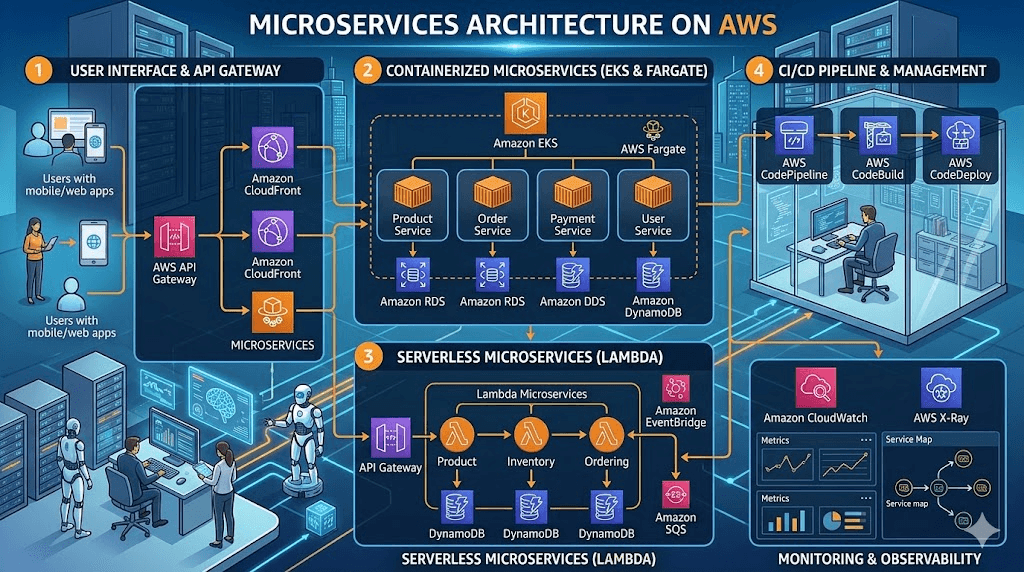
Modern applications are evolving faster than ever. Businesses want faster deployments, better scalability, and improved reliability — and that’s exactly where Microservices Architecture on AWS shines.
If you’re building modern cloud applications in 2026, microservices on AWS isn’t just an option — it’s becoming the standard approach.
At InspireViralTimes.com, we love stories of innovation that actually deliver results. Today, I’m walking you through everything you need to know about microservices on AWS: what they are, why they rock (and where they can trip you up), the exact AWS services that make the magic happen, pro tips for 2026, and real-world wins that’ll get you excited to try it yourself.
Grab a coffee, get comfortable, and let’s dive in. By the end, you’ll have a clear roadmap to start building apps that feel unstoppable.
In this guide, you’ll learn:
- What Microservices Architecture is
- Why AWS is perfect for Microservices
- Core AWS services used in Microservices
- Real-world architecture examples
- Benefits and challenges
- Best practices for 2026
Let’s dive in.
What Is Microservices Architecture?
Microservices Architecture is a design approach where an application is built as small, independent services instead of one large monolithic system.
Each microservice:
- Has its own logic
- Can be deployed independently
- Scales independently
- Communicates via APIs
Monolithic vs Microservices
Monolithic Application
- One large codebase
- Difficult to scale
- Risky deployments
- Slower innovation
Microservices Architecture
- Multiple small services
- Independent scaling
- Faster deployments
- Better reliability
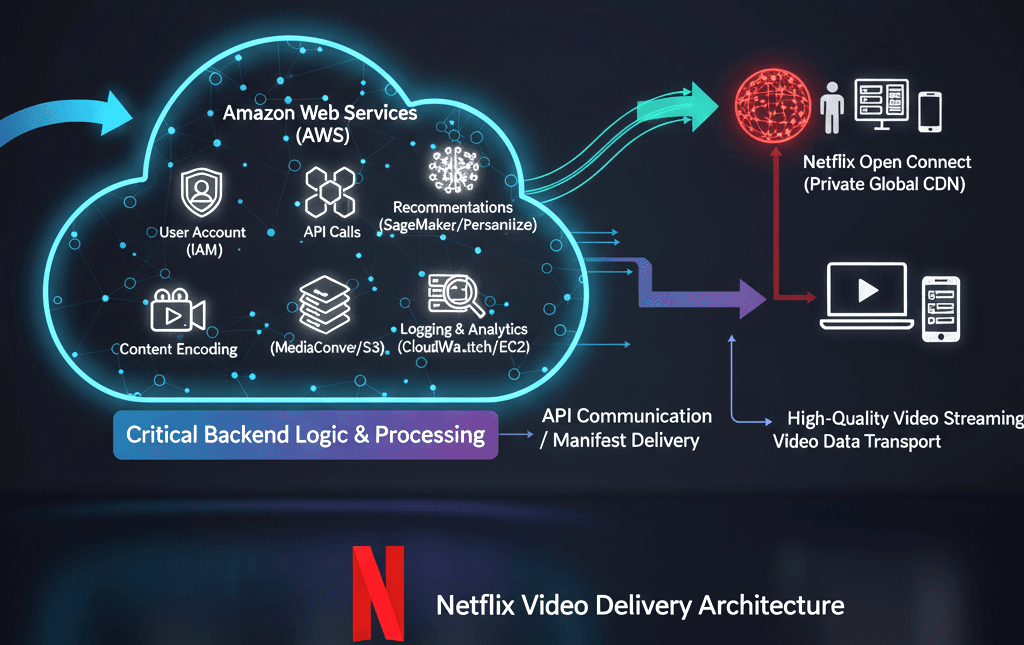
This is why companies like Netflix, Amazon, and Uber use microservices.
What Exactly Are Microservices? (And Why Monoliths Are So Yesterday)
Think of a monolith like one giant kitchen where everything—cooking, cleaning, serving—happens in the same room. Efficient at first, but when the party gets big, chaos ensues.
Microservices flip the script. Instead of one massive application, you break it into small, independent “services” that each do one thing really well (like user authentication, payments, or recommendations). They talk to each other through clean APIs or events, but they can be developed, deployed, and scaled separately.
The result?
- Teams own their own slice of the pie.
- Failures stay isolated (no more “the whole app is down”).
- You pick the best tech for each job—no more “one language rules them all.”
It’s like turning your solo chef into a world-class restaurant with specialized stations. Fast, flexible, and way more fun to run.
Why Use AWS for Microservices?
AWS provides everything needed to build, deploy, and scale microservices easily.
Key Advantages
✅ Fully managed services
✅ Auto scaling capabilities
✅ Pay-as-you-go pricing
✅ High availability
✅ Built-in security
✅ Global infrastructure
AWS removes the complexity so developers can focus on building features instead of managing infrastructure.
Core AWS Services for Microservices Architecture
Here are the most important AWS services used in microservices:
1. AWS Lambda
AWS Lambda allows you to run code without managing servers.
Why it’s useful for microservices:
- Event-driven architecture
- Auto scaling
- Pay only for execution time
- Serverless microservices
Example Use Case:
- User signup service
- Image processing
- Payment processing
2. Amazon API Gateway
API Gateway acts as the entry point for microservices.
Key Features
- REST APIs
- HTTP APIs
- WebSocket APIs
- Authentication & Authorization
- Rate limiting
Example Architecture
Client → API Gateway → Microservices
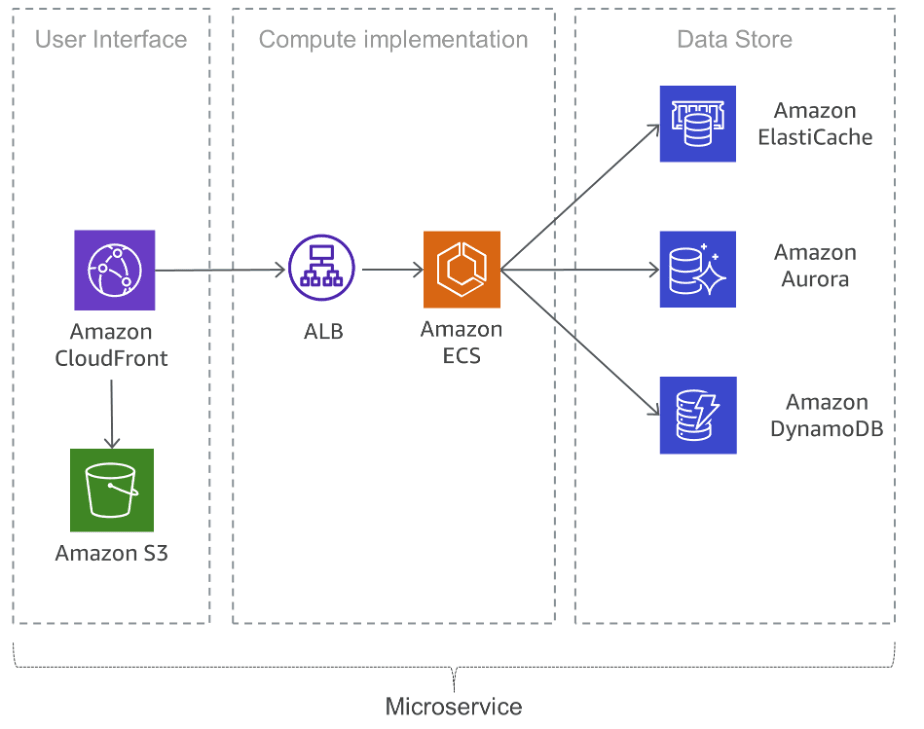
3. Amazon ECS (Elastic Container Service)
ECS helps run containerized microservices.
Benefits
- Easy container deployment
- Managed scaling
- Integrated with Docker
- Cost-efficient
Perfect for container-based microservices.
4. AWS Fargate
AWS Fargate runs containers without managing servers.
Why Use Fargate?
- No server management
- Automatic scaling
- Pay only for usage
- Works with ECS & EKS
This is ideal for modern microservices architecture.
5. Amazon EKS (Elastic Kubernetes Service)
EKS allows running Kubernetes-based microservices.
Best For
- Large-scale applications
- Complex deployments
- Enterprise workloads
Companies migrating from Kubernetes often choose EKS.
6. Amazon DynamoDB
DynamoDB is a serverless NoSQL database ideal for microservices.
Why DynamoDB?
- High performance
- Auto scaling
- Serverless
- Low latency
Each microservice can have its own database, improving reliability.
7. Amazon SQS
Amazon Simple Queue Service helps microservices communicate asynchronously.
Benefits
- Decoupled architecture
- Fault tolerance
- Message reliability
Example:
Order Service → SQS → Payment Service
8. Amazon SNS
SNS helps send notifications across services.
Use cases:
- Event-driven systems
- Notifications
- Fan-out architecture
9. AWS Step Functions
Step Functions coordinate multiple microservices.
Perfect for:
- Workflow automation
- Business processes
- Orchestration
Typical Microservices Architecture on AWS
A common architecture looks like this:
Users
  ↓
CloudFront
  ↓
API Gateway
  ↓
Lambda / ECS / EKS
  ↓
DynamoDB / RDS
  ↓
SQS / SNS
This architecture is:
- Highly scalable
- Fault tolerant
- Cost-efficient
Benefits of Microservices on AWS
1. Independent Scaling
Each service scales separately.
Example:
- Payment service scales during sales
- User service remains normal
This saves cost and improves performance.
2. Faster Deployment
Teams can deploy services independently.
No need to deploy the entire application.
3. Improved Reliability
If one microservice fails:
- Others continue working
- System remains available
4. Technology Flexibility
Each microservice can use different technology:
- Node.js
- Python
- Java
- Go
AWS supports all.
5. Better Team Productivity
Teams can work independently:
- Frontend team
- Backend team
- Payment team
- Analytics team
The Game-Changing Benefits of Microservices on AWS
Here’s where the real inspiration kicks in. When you run microservices on AWS, you don’t just get better software—you get superpowers:
- Lightning-fast agility: Deploy a new feature for payments without touching the recommendation engine. Teams ship updates daily instead of quarterly.
- Elastic scaling that saves money: Only scale the busy parts. Black Friday traffic? Auto-scale just the checkout service while everything else chills.
- Built-in resilience: One service goes down? The rest keeps humming. AWS handles the heavy lifting with multi-AZ and global infrastructure.
- Freedom to experiment: Try new languages, frameworks, or even serverless for experimental features—without risking the whole system.
- Faster time-to-market: Small, autonomous teams = innovation on steroids.
AWS makes this effortless with pay-as-you-go pricing and managed services, so you focus on building cool stuff instead of babysitting servers.
The Honest Truth: Challenges (and How AWS Helps)
No sugarcoating—microservices aren’t magic. You’ll face:
- More complexity in communication and data consistency.
- Debugging distributed systems (hello, “where did my request go?”).
- Team coordination and cultural shifts.
- Potential for higher costs if not managed wisely.
The good news? AWS has your back. Tools like distributed tracing, service meshes, and event-driven patterns turn these headaches into manageable (even enjoyable) challenges. And remember: not every app needs microservices from day one. Start small, evolve when it makes sense. (Fun fact: even Amazon’s Prime Video team optimized some workloads by simplifying back to a monolith for cost reasons—smart architecture means knowing when to flex.)
Why AWS Is the Ultimate Playground for Microservices
AWS didn’t just jump on the microservices bandwagon—they basically invented the playbook. With over a decade of real-world battle-testing (Netflix, anyone?), AWS offers a complete ecosystem that handles the boring stuff so you can focus on what matters.
You get:
- World-class security and compliance out of the box.
- Global reach with low-latency edge locations.
- Deep integration between services—no clunky third-party hacks.
It’s like having the world’s best orchestra conductor guiding your microservices symphony.
Challenges of Microservices Architecture
Microservices are powerful but come with challenges:
1. Complexity
Managing multiple services can be difficult.
Solution:
- Use monitoring tools
- Use automation
2. Monitoring
Need centralized monitoring.
Use:
- AWS CloudWatch
- AWS X-Ray
3. Data Consistency
Multiple databases create consistency issues.
Solution:
- Event-driven architecture
- Sagas pattern
Best Practices for Microservices on AWS (2026)
1. Use Serverless When Possible
Serverless reduces operational overhead.
Use:
- Lambda
- API Gateway
- DynamoDB
2. Use Infrastructure as Code
Use:
- AWS CloudFormation
- AWS CDK
- Terraform
3. Implement Observability
Use:
- CloudWatch
- AWS X-Ray
- AWS OpenSearch
4. Use CI/CD Pipelines
Automate deployments using:
- AWS CodePipeline
- GitHub Actions
- AWS CodeBuild
5. Design for Failure
Microservices must be resilient.
Use:
- Retry logic
- Circuit breaker
- Dead-letter queues
Real-World Example: E-commerce Microservices on AWS
An e-commerce platform might use:
- User Service → Lambda + DynamoDB
- Product Service → ECS + RDS
- Order Service → Lambda + SQS
- Payment Service → Lambda
- Notification Service → SNS
Each service runs independently.
When Should You Use Microservices?
Use Microservices when:
✅ Large applications
✅ Multiple teams
✅ Frequent deployments
✅ High scalability needs
Avoid Microservices when:
❌ Small applications
❌ Simple systems
❌ Small teams
Sometimes Monolith is better for small startups.
Future of Microservices on AWS
In 2026 and beyond:
- Serverless microservices will dominate
- AI-driven scaling will increase
- Event-driven architecture will grow
- Platform engineering will expand
AWS continues to lead innovation in this space.
Final Thoughts
Microservices Architecture on AWS is one of the most powerful ways to build modern cloud applications.
It offers:
- Scalability
- Reliability
- Faster development
- Cost efficiency
Whether you’re a startup or enterprise, adopting microservices on AWS can transform your architecture and accelerate innovation.
FAQ: Microservices Architecture on AWS
What is Microservices Architecture on AWS?
Microservices architecture on AWS is a cloud-based design where applications are built using independent services using AWS tools like Lambda, ECS, API Gateway, and DynamoDB.
Is AWS good for microservices?
Yes. AWS provides fully managed services, scalability, and reliability, making it ideal for microservices.
Which AWS services are used for Microservices?
Common services include:
- AWS Lambda
- API Gateway
- ECS
- EKS
- DynamoDB
- SQS
- SNS
Is Microservices better than Monolith?
Microservices are better for large, scalable applications, while monolith works better for small projects.


Comments are closed.