In today’s data-driven world, businesses are challenged not just by the volume of data but by its diversity, dispersion, and velocity. An enterprise might have transactional records stored in an on-premises database, streaming telemetry in cloud storage, and application logs in SaaS platforms. Turning this sprawling collection into meaningful insights requires a platform that can connect, orchestrate, transform, and deliver data — and that’s precisely where Azure Data Factory (ADF) shines.
What Is Azure Data Factory?
Azure Data Factory is Microsoft’s cloud-native, fully managed data integration and orchestration service. It enables organizations to create data-driven workflows (called pipelines) that move, transform, and enrich data at scale across virtually any source and destination — whether on-premises, hybrid, or cloud-native. Unlike traditional ETL tools that require infrastructure to manage, ADF operates on a serverless, pay-as-you-use model, simplifying both operational overhead and cost.
Why ADF Matters
In large enterprises, data often comes from disparate sources — SQL databases, cloud storage, APIs, IoT systems, and more. ADF abstracts the complexity of integrating these systems. With more than 90 built-in connectors, it’s possible to ingest and orchestrate data from SaaS apps, enterprise data stores, big data systems, and streaming platforms without writing custom plumbing code.
This means:
- Centralized orchestration: All data movement and transformation logic lives in one place.
- Scalable operations: Pipelines scale with the workload using Azure’s elastic compute backbone.
- Repeatable and auditable workflows: Version control and CI/CD integration with GitHub or Azure DevOps make delivery reliable.
Core Architectural Components
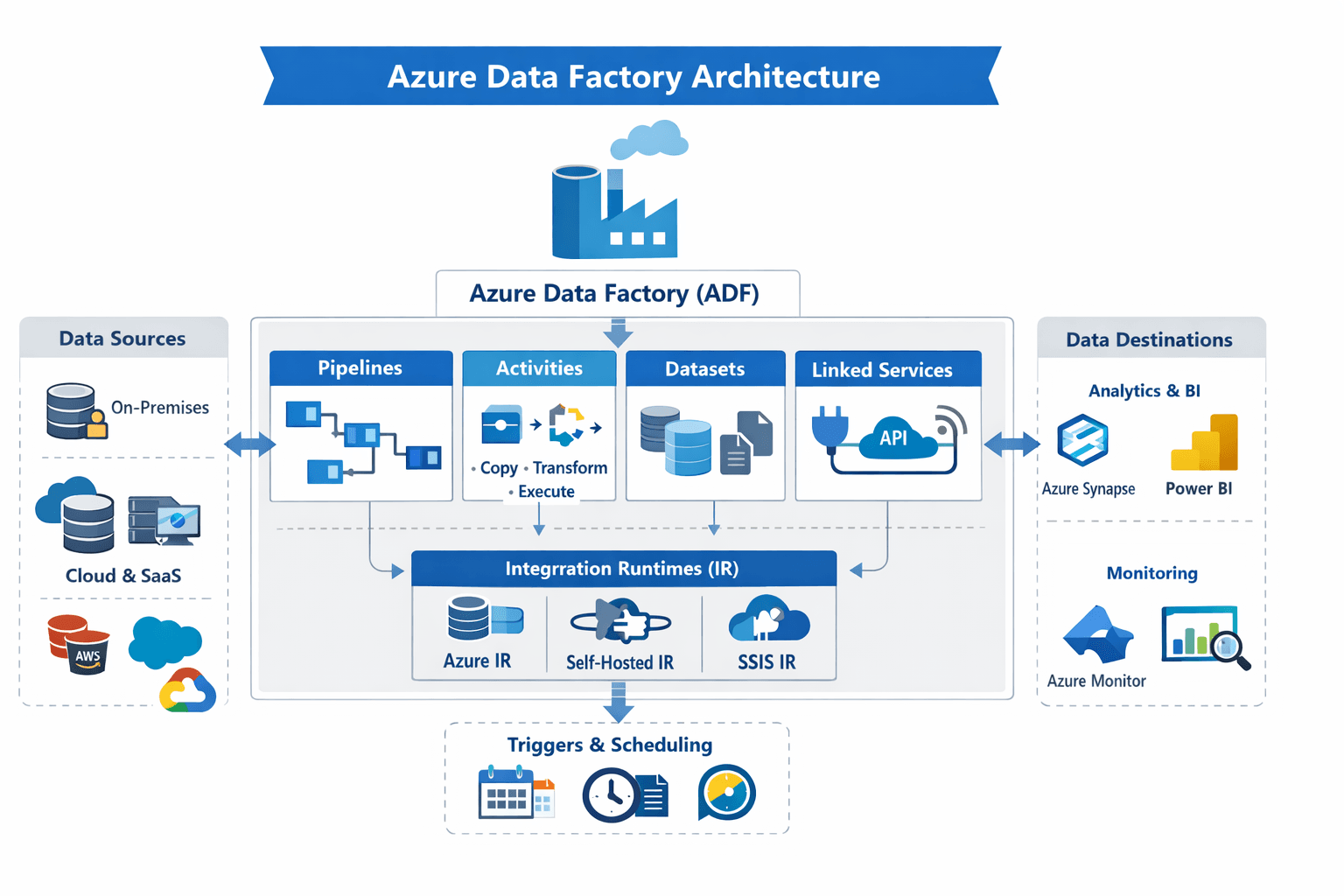
At the heart of Azure Data Factory’s architecture are a handful of core components that work together to enable robust data engineering.
1. Pipelines
A pipeline is a logical grouping of activities that together perform a unit of work. Think of it as a data workflow that defines what tasks need to run and in what order. A single pipeline can run multiple activities in sequence or in parallel, depending on your logic.
2. Activities
An activity is a step within a pipeline — for example, copying data from a source to a sink, transforming data using a compute service, or running control logic like looping and branching.
3. Datasets
A dataset represents the structure of data within data stores — essentially a pointer to the data you want to process. These are reusable and help define inputs and outputs for your pipelines.
4. Linked Services
Linked services are like connection strings. They define how ADF connects to data stores and compute services. Whether it’s an Azure SQL Database, Amazon Redshift, on-premises Oracle server, or an HTTP API, linked services encapsulate the connection details securely.
5. Integration Runtimes (IR)
Integration runtimes power the execution of activities. They are the compute infrastructure that moves data and executes tasks. ADF supports multiple types:
- Azure IR for cloud data movement and transformation.
- Self-hosted IR for on-premises access.
- SSIS IR for lifting existing SSIS packages into the cloud.
6. Triggers & Scheduling
Triggers define when pipelines should run — on a schedule, on specific events (like file arrival), or manually. This enables both batch orchestration and event-driven processing at enterprise scale.
How ADF Fits Into Modern Data Platforms
Azure Data Factory is often the backbone of modern analytical platforms. It typically acts as the orchestration layer connecting:
- Data ingestion: Pulling raw data from sources into a centralized landing zone such as Azure Data Lake Storage.
- Data transformation: Using visual data flows or external compute (e.g., Databricks, HDInsight, SQL pools) to clean, enrich, restructure, and aggregate data.
- Loading & publishing: Delivering processed data to analytics engines like Azure Synapse Analytics, Power BI, or downstream ML systems.
- Monitoring & governance: Tracking pipeline execution, failures, and performance metrics via Azure Monitor.
This architectural approach enables businesses to build end-to-end data workflows that are maintainable, auditable, and responsive to change — whether they’re building data lakes, analytics platforms, or AI-driven solutions.
The Bigger Picture: Orchestration in the Cloud Era
What sets Azure Data Factory apart in a crowded ecosystem is its serverless integration, scalability, and extensibility. It abstracts complex orchestration patterns while letting data engineers focus on logic rather than infrastructure. It transforms raw, heterogeneous data into actionable assets with agility and reliability. For teams on digital transformation journeys, ADF is not just a tool — it’s a strategic enabler in their cloud analytics platforms.
Core Architectural Components
Understanding ADF’s architecture is easier when broken down into six core components:
- Pipelines – Logical groupings of activities that define a complete workflow. Pipelines can run tasks sequentially or in parallel.
- Activities – Individual steps within a pipeline, such as copying data, transforming datasets, or running conditional logic.
- Datasets – Represent structured data within a store and act as inputs/outputs for pipeline activities.
- Linked Services – Connection definitions for data stores or compute services (e.g., Azure SQL Database, Amazon Redshift).
- Integration Runtimes (IR) – The compute engine for executing activities. Options include:
- Azure IR for cloud data movement
- Self-hosted IR for on-premises connectivity
- SSIS IR for migrating existing SSIS packages
- Triggers & Scheduling – Control when pipelines execute: on a schedule, upon events, or manually.