Cyberattacks are no longer rare events—they’re daily occurrences. Whether you’re using a laptop, smartphone, or even a smart TV, attackers are constantly looking for ways to gain access.
In 2026, most people imagine hackers as hoodie-wearing geniuses typing furiously in dark rooms, cracking complex codes in seconds. The reality is far more mundane—and far more dangerous: the vast majority of successful hacks start with a single human mistake, amplified by accessible tools and AI.
Hackers rarely “break in” like in movies. They trick, exploit trust, use stolen keys, or slip through forgotten doors. Understanding the actual step-by-step process helps you spot—and stop—them before damage occurs.
This beginner-friendly guide walks through how hackers really hack your computer (or phone, or home network) in 2026, using the most common real-world paths seen today.
This guide breaks down how hackers actually hack your computer, using real-world methods explained in simple terms—no technical background required.
🔍 What “Hacking” Really Means
Hacking isn’t always like the movies. In reality, it’s about finding and exploiting weaknesses in systems, software, or human behavior.
Hackers typically aim to:
- Steal personal data (passwords, banking info)
- Install malware or spyware
- Take control of your device
- Use your system for larger attacks (botnets, crypto mining)
🧠 The 5 Most Common Ways Hackers Break In
1. Phishing Attacks (The #1 Method)
Phishing is the easiest and most effective technique.
How it works:
- You receive an email or message that looks legitimate (bank, social media, delivery service)
- It asks you to click a link or download a file
- You enter your credentials → attacker captures them instantly
Example:
A fake email pretending to be from PayPal asking you to “verify your account.”
Reality: You just handed your password to a hacker.
2. Malware Installation (Hidden Software Attacks)
Malware is malicious software that secretly infects your system.
Common types:
- Viruses
- Trojans
- Ransomware
- Spyware
How hackers install it:
- Fake downloads (cracked software, free tools)
- Email attachments
- Infected websites
Notorious example:
WannaCry ransomware spread worldwide by exploiting system vulnerabilities.
3. Weak Passwords & Credential Stuffing
If you’re still using simple passwords like “123456” or reusing passwords, you’re an easy target.
How it works:
- Hackers use leaked databases of usernames/passwords
- Automated bots try those combinations on multiple sites
Tools used:
- Password cracking software
- Botnets for mass login attempts
Key issue: Humans reuse passwords across platforms.
4. Exploiting Software Vulnerabilities
Every piece of software has bugs. Hackers exploit them before developers fix them.
Example:
The EternalBlue exploit was used to attack outdated Windows systems.
How it works:
- Hacker scans for outdated systems
- Finds known vulnerabilities
- Executes code remotely
5. Public Wi-Fi Attacks (Man-in-the-Middle)
Using public Wi-Fi can expose your data.
How hackers attack:
- Create fake Wi-Fi networks (e.g., “Free Airport WiFi”)
- Intercept data between your device and the internet
What they can steal:
- Login credentials
- Credit card info
- Emails and chats
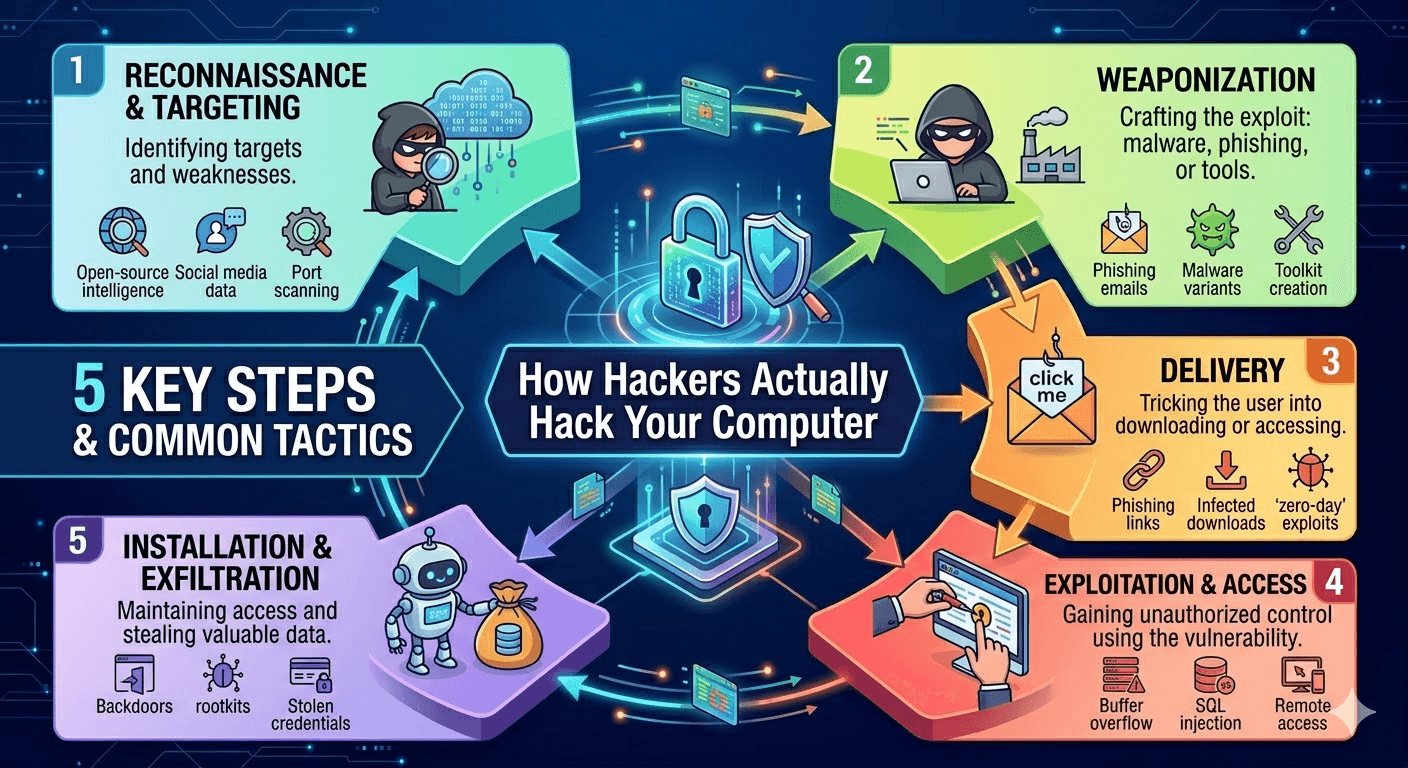
⚙️ Step-by-Step: How a Typical Hack Happens
Here’s a simplified real-world attack flow:
- Reconnaissance
- Hacker gathers info about you (email, social profiles)
- Entry Point
- Sends phishing email or finds vulnerability
- Exploitation
- You click a link or system gets exploited
- Installation
- Malware installs silently
- Control
- Hacker gains remote access
- Data Theft / Damage
- Files stolen, accounts hijacked, or ransomware triggered
🚨 Signs Your Computer Has Been Hacked
Watch out for these red flags:
- Sudden slow performance
- Unknown programs installed
- Frequent pop-ups or ads
- Browser redirects
- Accounts sending messages you didn’t write
- Antivirus disabled automatically
🛡️ How to Protect Yourself (Practical Tips)
🔐 Strengthen Your Passwords
- Use long, unique passwords
- Consider a password manager
📩 Avoid Suspicious Links
- Always verify emails before clicking
- Check sender addresses carefully
🔄 Keep Software Updated
- Enable auto-updates for OS and apps
🔒 Use Antivirus & Firewall
- Real-time protection is essential
🌐 Avoid Public Wi-Fi (or Use VPN)
- Never access banking or sensitive accounts on open networks
🔑 Enable 2-Factor Authentication (2FA)
- Adds an extra security layer even if your password is stolen
💡 Why This Matters More in 2026
Cyberattacks are becoming:
- More automated (AI-driven hacking tools)
- More targeted (personalized phishing)
- More damaging (ransomware, identity theft)
Even large companies get breached—meaning your data may already be circulating online.
ow to Make Yourself a Hard Target in 2026
Most hacks fail against prepared people. Focus here:
- Unique strong passwords + password manager — Stop reuse.
- MFA everywhere — Hardware key or app, never SMS.
- Auto-update everything — OS, apps, browser, router firmware.
- Reputable endpoint protection — With behavioral/AI detection + ransomware rollback.
- 3-2-1 backups — 3 copies, 2 media types, 1 offline/air-gapped.
- Skepticism habits — Verify urgent requests via known channel. Hover over links. Avoid pasting unknown commands.
- Browser hygiene — Block third-party scripts when possible; use uBlock Origin.
- Network segmentation — IoT on guest Wi-Fi; VPN on public networks.
Bottom Line
Hackers in 2026 succeed because of human predictability, lazy defaults, and trust in familiar brands—not superhuman skill.
The good news? You control most of those factors. Treat your digital life like physical security: lock doors (MFA), update alarms (patches), don’t open to strangers (phishing skepticism), and keep backups (3-2-1).
One small habit change—like enabling a hardware security key—can stop 99% of these attack paths cold.
🧾 Final Thoughts
Hackers don’t “break in” randomly—they exploit predictable human mistakes and known system weaknesses.
The good news?
You don’t need to be a cybersecurity expert to stay safe. Just follow smart habits:
- Think before you click
- Update everything
- Never reuse passwords
🔥 Quick Summary
- Phishing is the #1 attack method
- Malware spreads through downloads and emails
- Weak passwords are a major vulnerability
- Outdated software = open door for hackers
- Public Wi-Fi can expose your data