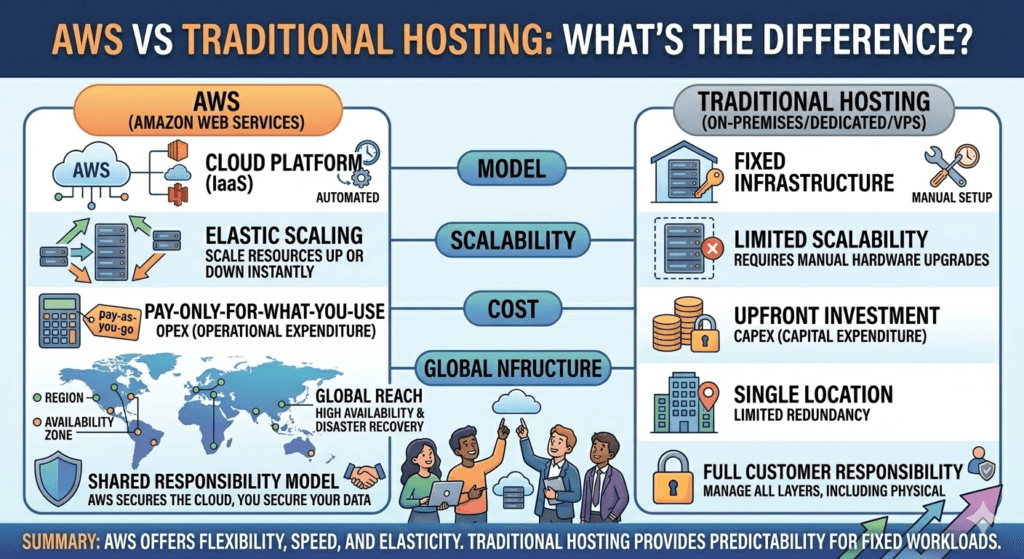
IIn today’s digital-first world, choosing the right hosting solution can determine your website’s performance, scalability, and long-term success. If you’ve ever compared Amazon Web Services (AWS) with traditional hosting, you’ve likely wondered: Which one is better—and why?
Let’s break it down in a clear, practical way.
🚀 What Is AWS (Cloud Hosting)?
Amazon Web Services (AWS) is a cloud computing platform that allows you to rent computing resources (servers, storage, databases) on-demand over the internet.
Instead of relying on a single physical server, AWS uses a global network of data centers to distribute your application.
Key AWS Services:
- EC2 (virtual servers)
- S3 (storage)
- RDS (databases)
- Lambda (serverless computing)
👉 Think of AWS like Netflix for servers — you only pay for what you use.
🖥️ What Is Traditional Hosting?
Traditional hosting (also called shared or dedicated hosting) is when your website is hosted on a fixed physical server.
Popular providers include:
- GoDaddy
- Bluehost
- HostGator
Here, your website lives on a single machine (or limited infrastructure), often shared with other websites.
👉 Think of it like renting an apartment with fixed space.
⚖️ AWS vs Traditional Hosting: Key Differences
1. 🔄 Scalability
AWS:
- Instantly scale up/down based on traffic
- Auto-scaling features handle traffic spikes
Traditional Hosting:
- Limited resources
- Requires manual upgrade (often downtime)
👉 Winner: AWS
2. 💰 Pricing Model
AWS:
- Pay-as-you-go pricing
- No upfront cost
- Can get expensive if not managed properly
Traditional Hosting:
- Fixed monthly/yearly pricing
- Predictable costs
👉 Winner: Depends:
- Beginners → Traditional hosting
- Growing businesses → AWS
3. ⚡ Performance
AWS:
- Global infrastructure (low latency)
- Load balancing
- CDN integration
Traditional Hosting:
- Performance depends on server quality
- Limited optimization options
👉 Winner: AWS
4. 🔐 Security
AWS:
- Enterprise-grade security
- DDoS protection, encryption, IAM controls
Traditional Hosting:
- Basic security features
- Limited control over configurations
👉 Winner: AWS
5. 🛠️ Ease of Use
AWS:
- Complex setup (not beginner-friendly)
- Requires technical knowledge
Traditional Hosting:
- One-click installs (WordPress, etc.)
- Beginner-friendly dashboards
👉 Winner: Traditional Hosting
6. 🧠 Flexibility & Control
AWS:
- Full control over infrastructure
- Custom architecture possible
Traditional Hosting:
- Limited customization
- Restricted environment
👉 Winner: AWS
📊 Quick Comparison Table
| Feature | AWS | Traditional Hosting |
|---|---|---|
| Scalability | Unlimited | Limited |
| Pricing | Pay-as-you-go | Fixed |
| Performance | High (global servers) | Moderate |
| Security | Advanced | Basic |
| Ease of Use | Complex | Easy |
| Flexibility | Full control | Limited |
🧩 When Should You Choose AWS?
Choose AWS if:
- You expect high traffic growth
- You’re building a startup or SaaS product
- You need high performance & uptime
- You want global reach
🏠 When Should You Choose Traditional Hosting?
Choose traditional hosting if:
- You’re a beginner
- You run a small blog or website
- You want low, predictable costs
- You prefer simple setup
🧠 Final Verdict
There’s no one-size-fits-all answer.
- If you want power, scalability, and future growth → go with Amazon Web Services
- If you want simplicity and affordability → traditional hosting providers like Bluehost or HostGator are better
🔥 Pro Tip (For Bloggers & Startups)
Start with traditional hosting → then migrate to AWS as your traffic grows.
This hybrid approach is what many successful websites use.
In 2026, if you’re launching a website, app, or online business, you face a key choice early: go with traditional hosting (shared, VPS, or dedicated servers from providers like Hostinger, Bluehost, SiteGround, or even older colo/on-prem setups) or jump straight to AWS (Amazon Web Services), the world’s leading cloud platform.
AWS holds roughly 29–32% of the global cloud infrastructure market (depending on the latest quarterly reports), powering giants like Netflix and countless startups. Traditional hosting still dominates for simple sites and small businesses because it’s simpler and often cheaper at low scale.
But what’s actually different? Let’s break it down clearly—no fluff, just the real contrasts in 2026.
1. Core Model: Rent-a-Server vs. Build-Your-Own Data Center
Traditional Hosting You rent a pre-configured slice of a physical (or virtual) server.
- Shared hosting: hundreds of sites on one server
- VPS: virtual private server (more isolation)
- Dedicated: entire physical machine
The provider handles hardware, power, cooling, and basic networking. You mostly manage the OS, web server (Apache/Nginx), and your app.
AWS (Cloud Computing) You don’t rent “a server”—you rent individual resources on demand from a massive global pool:
- Compute (EC2 virtual machines, Lambda functions)
- Storage (S3, EBS)
- Databases (RDS, DynamoDB)
- Networking (VPC, CloudFront CDN)
- And 200+ other services
You assemble exactly what you need, like Lego blocks. No physical hardware ownership.
2. Scalability & Elasticity
This is where AWS pulls far ahead.
Traditional Scaling usually means:
- Upgrade your plan (shared → VPS → dedicated)
- Add more servers manually (load balancers, manual config)
- Wait hours/days for provisioning
Bursts (Black Friday traffic, viral post) can crash your site unless you over-provision expensively.
AWS True elasticity:
- Auto Scaling Groups add/remove EC2 instances in minutes based on CPU/load
- Serverless (Lambda) scales to zero or millions of requests automatically
- Global CDN (CloudFront) caches content at 400+ edge locations worldwide
You can go from 10 visitors to 10 million without touching a server.
3. Pricing: Predictable vs. Pay-as-You-Go
Traditional Mostly fixed monthly/annual fees.
- Shared: $3–$15/mo
- VPS: $10–$100/mo
- Dedicated: $100–$500+/mo
You pay the same whether your site gets 1 visitor or 100,000. Predictable budgeting, but wasteful if underused.
AWS Pay only for what you use (per second, per GB, per request).
- Free tier: generous for learning/small projects
- Tiny static site on S3 + CloudFront: often <$1–$5/mo
- But: bills can surprise if you forget to shut down resources or misconfigure
In 2026, AWS is often cheaper for variable/low-traffic workloads and static sites, but traditional wins for steady, predictable medium traffic due to no egress fees or hidden charges in many cases.
4. Management & DevOps Effort
Traditional Easier for beginners:
- cPanel or similar dashboard
- One-click WordPress installs
- Provider handles OS updates, security patches (shared plans)
You still SSH in for custom work.
AWS More powerful but steeper learning curve:
- Console, CLI, CDK/Terraform for infrastructure-as-code
- You manage patching (unless using managed services like Lightsail or Elastic Beanstalk)
- IAM policies, VPCs, security groups require thought
Managed AWS options (Lightsail, Amplify) narrow the gap for simpler sites in 2026.
5. Performance & Reliability
Traditional Modern VPS/dedicated with NVMe SSDs, good networks, and caching can match or beat basic AWS setups for single-region traffic. Uptime often 99.9%+.
AWS
- 99.99%+ SLAs on many services
- Multi-AZ (availability zones) and multi-region redundancy built-in
- Global anycast networking and massive edge presence
For global audiences or mission-critical apps, AWS usually wins on raw performance and failover.
Quick Comparison Table (2026 Reality)
| Aspect | Traditional Hosting | AWS (Cloud) |
|---|---|---|
| Best for | Simple sites, blogs, small biz, beginners | Apps with variable traffic, scaling needs, global reach |
| Upfront cost | Low–medium (plans) | $0 (pay-as-you-go) |
| Monthly cost (small site) | $5–$50 predictable | $0–$20 (but watch usage) |
| Scalability | Manual / plan upgrades | Automatic / near-infinite |
| Learning curve | Low | Medium–high (but Lightsail lowers it) |
| Control/Customization | Medium (VPS/dedicated high) | Extremely high |
| Uptime SLA | Usually none or 99.9% | 99.5–99.99%+ with credits |
| Global speed | Depends on provider locations | Excellent (CloudFront edges everywhere) |
| Egress/transfer fees | Often included/unlimited | Charged (but decreasing in many cases) |
So… Which Should You Choose in 2026?
- Pick traditional hosting if: You’re running a blog, portfolio, small e-commerce, or WordPress site with steady traffic. You want simplicity, predictable bills, and minimal setup time.
- Pick AWS if: You expect growth/spikes, need serverless, global users, advanced databases/AI/ML, or want infrastructure as code. You’re building an app/startup and plan to scale (or already have).
Many people start on traditional (or AWS Lightsail for an easy bridge), then migrate to full AWS as needs grow.
The gap has narrowed—AWS Lightsail and similar simplified offerings make cloud accessible—but the fundamental philosophy remains: traditional hosting rents you a ready room; AWS hands you the keys to an entire customizable city.