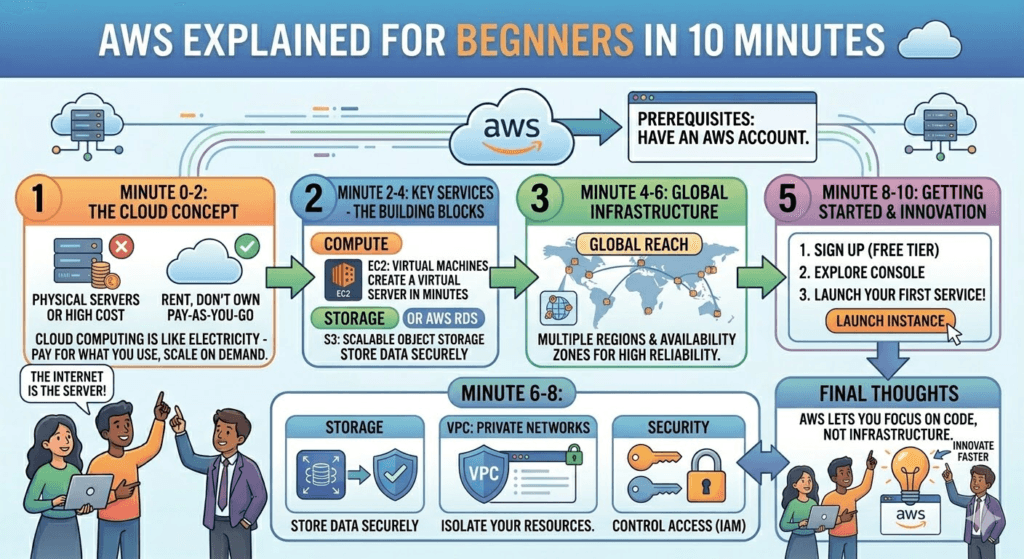
If you’ve ever wondered how apps like Netflix stream smoothly or how startups scale overnight, the answer often comes down to one thing: cloud computing—and at the center of it is Amazon Web Services. Amazon Web Services (AWS) is the world’s leading cloud computing platform. Launched in 2006, it now powers everything from startups to massive enterprises like Netflix, Airbnb, and even parts of NASA. In 2026, AWS still holds roughly 30–31% of the global cloud market and offers over 200 services. But as a beginner, you don’t need to learn everything—just the core building blocks that appear in almost every project.
This 10-minute read covers the absolute essentials: what AWS is, why it matters, and the 7–8 services beginners use most. This guide breaks down AWS in the simplest way possible—so you can understand it in just 10 minutes.
🚀 What Is AWS?
AWS (Amazon Web Services) is a cloud computing platform launched by Amazon in 2006. It provides on-demand computing services like storage, servers, databases, and more—over the internet.
👉 Instead of buying expensive hardware, you can rent resources online and pay only for what you use.
🧠 What Is Cloud Computing?
Cloud computing means storing and accessing data and programs over the internet instead of your computer’s hard drive.
Simple analogy:
- Old way: Buy a computer/server → Install software → Maintain it
- AWS way: Rent everything online → Use instantly → No maintenance
⚙️ How AWS Works (In Simple Terms)
AWS operates through a global network of data centers. These are organized into:
- Regions – Geographic areas (e.g., US East, Asia Pacific)
- Availability Zones – Isolated data centers within a region
This setup ensures:
- High availability
- Fast performance
- Disaster recovery
🧩 Core AWS Services You Should Know
Here are the most important AWS services beginners should understand:
1. 🖥️ EC2 (Elastic Compute Cloud)
- Virtual servers in the cloud
- Launch apps without physical machines
👉 Think of it as renting a computer online
2. 📦 S3 (Simple Storage Service)
- Store files, images, videos
- Highly secure and scalable
👉 Like Google Drive, but for developers
3. 🗄️ RDS (Relational Database Service)
- Managed databases (MySQL, PostgreSQL, etc.)
- AWS handles backups and updates
4. 🌐 Lambda (Serverless Computing)
- Run code without managing servers
- Pay only when your code runs
5. 🌍 CloudFront
- Content Delivery Network (CDN)
- Delivers content faster worldwide
💰 AWS Pricing (Simple Breakdown)
AWS uses a pay-as-you-go model:
- No upfront cost
- Pay only for what you use
- Free tier available for beginners
👉 This makes it perfect for startups and learners
🔐 Is AWS Safe?
Yes—AWS is one of the most secure cloud platforms.
It offers:
- Data encryption
- Identity & Access Management (IAM)
- Compliance with global security standards
Even governments and banks trust AWS.
🌎 Who Uses AWS?
Many major companies rely on AWS, including:
- Netflix
- Airbnb
- NASA
- Spotify
🎯 Why Learn AWS in 2026?
AWS skills are in high demand right now.
Benefits:
- High-paying jobs 💰
- Work in cloud, DevOps, AI
- Used by 90%+ of enterprises
👉 Roles include:
- Cloud Engineer
- DevOps Engineer
- Solutions Architect
🛠️ How to Get Started with AWS
- Create a free account on AWS
- Use the Free Tier
- Start with EC2 + S3
- Learn basic networking (VPC)
- Practice real-world projects
⚡ Final Thoughts
AWS is not just a tool—it’s the backbone of the modern internet.
Once you understand the basics, you unlock:
- Unlimited scalability
- Global infrastructure
- Real-world tech skills
🔎 Quick Recap
- AWS = Cloud platform by Amazon
- Lets you rent servers, storage, and more
- Pay only for what you use
- Used by top global companies
- Essential skill for future tech careers
Quick Mental Map – How These Pieces Fit Together
Typical beginner project flow:
- Store images/files → S3
- Run web/app backend → EC2 (traditional) orLambda + API Gateway (serverless)
- Store structured data → RDS or DynamoDB (NoSQL)
- Make everything private & secure → VPC + IAM
- Monitor health & costs → CloudWatch
- Point your domain → Route 53
Free Tier – Your Best Friend as a Beginner (2026)
AWS offers a generous Always Free tier on many services (S3, Lambda, DynamoDB…) + 12 months free on others (EC2, RDS…). You can build real projects for $0–$5/month if you’re careful.
Watch two things:
- Forgot to turn off EC2/RDS → surprise bill
- Data transfer out of AWS (usually cheap, but adds up)
Where to Go Next (2–5 Minutes)
- Create a free AWS account → https://aws.amazon.com/free/
- Do the official “Getting Started” tutorials (AWS console walkthroughs)
- Build one tiny project:
- Static website on S3 (fastest win)
- Small Node.js/Python API with Lambda + API Gateway
- WordPress on EC2 + RDS
- Watch free YouTube crash courses (search “AWS beginner 2026” — many excellent 1–2 hour overviews)
- Aim for AWS Certified Cloud Practitioner after 1–3 months (great resume booster)
AWS looks huge, but 80% of real work uses just 10–15 services. Master S3 + EC2/Lambda + IAM + RDS first — you’ll already be more dangerous than most beginners.
Happy cloud building! ☁️