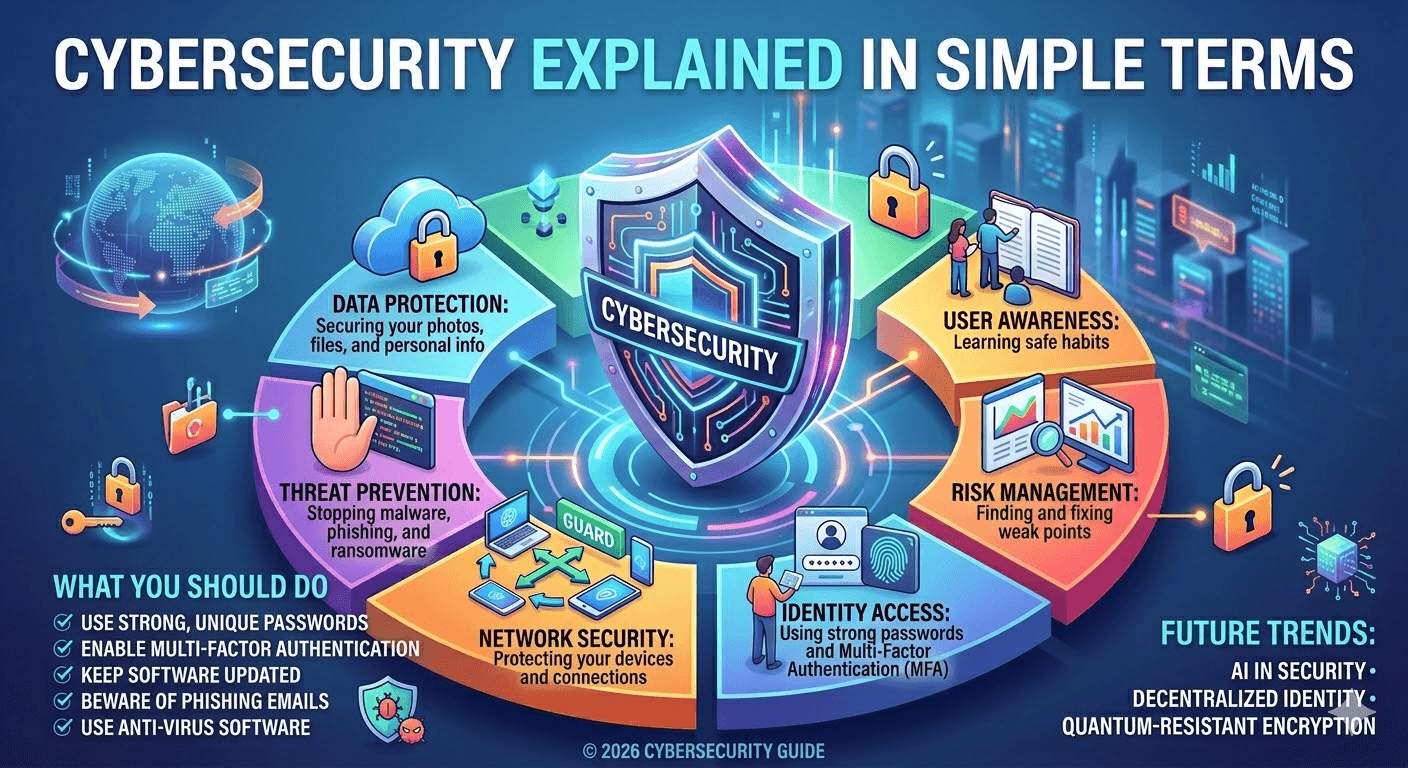
In today’s digital age, cybersecurity isn’t just for tech experts—it affects everyone. From your smartphone to your smart fridge, everything connected to the internet is a potential target for cyber threats. But what exactly is cybersecurity, and why is it so important? Let’s break it down in simple terms.
What it is, why it matters, and how to protect yourself without a PhD.
You’ve heard the word “cybersecurity” a thousand times. Maybe it makes you think of hackers, firewalls, or complicated IT stuff. But here’s the truth: cybersecurity is just common sense, applied to your digital life.
Think of it this way: you lock your front door, you don’t leave your car keys in the ignition, and you look both ways before crossing the street. Cybersecurity is exactly the same—only instead of protecting your house and car, you’re protecting your computer, phone, and online accounts.
In this article, I’ll break down what cybersecurity really means, why it matters to you, and the simple habits that keep you safe. No jargon. No complexity. Just the essentials.
What Is Cybersecurity?
Cybersecurity is the practice of protecting computers, networks, programs, and data from unauthorized access, attacks, or damage. Think of it as locking the doors and windows of your digital world to keep intruders out. Just like you wouldn’t leave your house unlocked, you shouldn’t leave your devices and online accounts vulnerable.
Cybersecurity is the practice of keeping your digital stuff safe—your personal information, your money, your photos, and your devices—from people who want to steal, damage, or misuse them.
That’s it. It’s digital self‑defense.
At its core, cybersecurity aims to:
- Protect sensitive information – personal data, financial records, passwords, and business secrets.
- Prevent attacks – stopping hackers from gaining unauthorized access.
- Maintain digital safety – ensuring systems run smoothly without disruption.
Why Cybersecurity Matters
Cyber threats are everywhere. According to recent statistics, millions of cyberattacks happen every year, targeting individuals, small businesses, and large corporations alike. Here’s why it matters:
- Protect Your Identity – Hackers can steal personal data and use it for identity theft.
- Keep Your Money Safe – Online banking, e-commerce, and payment apps are prime targets.
- Avoid Business Losses – Companies can lose millions from ransomware attacks or data breaches.
- Preserve Privacy – Cybersecurity helps prevent unauthorized tracking and surveillance.
In 2026, with AI, IoT, and cloud computing advancing rapidly, cybersecurity is more important than ever.
The Three Goals of Cybersecurity (The CIA Triad, Made Simple)
Security experts often talk about the “CIA Triad.” No, not that CIA—it stands for Confidentiality, Integrity, and Availability. In plain English:
1. Confidentiality – “Only you should see your stuff.”
Your private messages, bank statements, and personal photos should stay private. Cybersecurity ensures that the wrong people can’t sneak a peek.
2. Integrity – “Your stuff should stay as you left it.”
No one should be able to tamper with your files, change your passwords, or alter your messages. What’s yours should remain exactly as you intended.
3. Availability – “You can get to your stuff when you need it.”
If a hacker locks you out of your account or encrypts your files (ransomware), you no longer have access. Cybersecurity makes sure your data is there for you, not held hostage.
Common Cyber Threats
Understanding threats is the first step to protecting yourself. Here are some common ones:
- Phishing: Fake emails or messages tricking you into revealing personal information.
- Malware: Software designed to harm or gain access to your device.
- Ransomware: Malware that locks your files until a ransom is paid.
- Data Breaches: Unauthorized access to sensitive information.
- Social Engineering: Manipulation to trick people into giving access or information.
Simple Steps to Stay Safe Online
You don’t need to be a tech wizard to practice good cybersecurity. Here are some simple steps anyone can take:
- Use Strong Passwords – Make them long, unique, and use a password manager.
- Enable Two-Factor Authentication (2FA) – Adds an extra layer of security.
- Keep Software Updated – Patches fix vulnerabilities hackers exploit.
- Be Careful with Emails & Links – Don’t click on suspicious attachments or links.
- Back Up Your Data Regularly – Protects you from ransomware or accidental loss.
- Use Secure Networks – Avoid public Wi-Fi for sensitive transactions.
Why Should You Care? (The Stakes in 2026)
Maybe you think, “I’m not a celebrity or a big company. Why would anyone target me?”
Here’s the reality: hackers aren’t usually after you personally—they’re after easy targets. They cast a wide net, hoping to catch anyone who reuses passwords, clicks a bad link, or leaves a digital door unlocked.
If they get into your email, they can:
- Reset passwords for your bank, social media, and shopping accounts.
- Impersonate you to scam your friends and family.
- Sell your personal info on the dark web.
And in 2026, with AI‑powered scams on the rise, the risks are greater than ever.
The Role of Ethical Hackers
Not all hackers are bad. Ethical hackers, also called white-hat hackers, help identify security weaknesses before malicious hackers can exploit them. Many companies hire ethical hackers to strengthen their systems—a proactive approach to cybersecurity.
The Most Common Threats (In Simple Terms)
You don’t need to memorize a list of technical terms. Just understand these five common threats:
| Threat | What It Is | Simple Example |
|---|---|---|
| Phishing | A fake message designed to trick you. | An email that looks like it’s from Netflix, saying “Your account is suspended—click here to verify.” The link leads to a fake login page that steals your password. |
| Malware | Malicious software that infects your device. | You download a “free” screensaver that actually installs a program that spies on everything you type (keylogger). |
| Ransomware | Malware that locks your files and demands money. | You open an attachment, and suddenly all your documents are encrypted. A pop‑up says “Pay $500 in Bitcoin to get your files back.” |
| Password Theft | When someone gets your login credentials. | You use the same password for 20 sites. One of them gets hacked, and criminals try that password on your email and bank accounts. |
| Man‑in‑the‑Middle | Someone intercepts your communication. | You connect to “Free Airport Wi‑Fi,” and a hacker on the same network captures your login details as you check your bank account. |
Final Thoughts
Cybersecurity doesn’t have to be complicated. By understanding the basics and following simple best practices, you can protect yourself, your family, and your business from digital threats. Remember, the best defense is awareness and preparation.
In 2026, as technology becomes smarter and more interconnected, staying cyber-safe is not optional—it’s essential.
Pro Tip: Treat cybersecurity like hygiene—daily habits like updating passwords and backing up data make a huge difference in keeping your digital life safe.