Microsoft has released an emergency update to address a major issue that breaks sign-ins with Microsoft accounts across multiple Microsoft apps, including Teams and OneDrive.
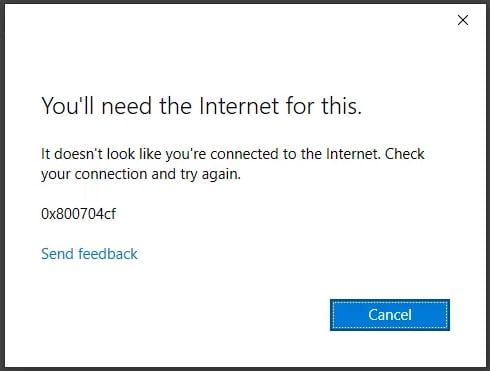
This issue appears after installing the KB5079473 cumulative update that Microsoft released as part of this month’s Patch Tuesday, and it warns users that the affected devices are not connected to the Internet.
The list of affected apps also includes Microsoft Edge, Microsoft 365 Copilot, and Office apps such as Excel and Word, which display the same error message for features that require a Microsoft account sign-in.
“As a result of this issue, sign in attempts will display an error message with text similar to ‘You’ll need the Internet for this. It doesn’t look like you’re connected to the Internet.’ This appears even if the device is connected to the Internet,” Microsoft said when it acknowledged the bug on Friday.
“Please note that this issue occurs only with sign in operations involving Microsoft accounts, which are commonly used for Microsoft Teams Free. Businesses using Entra ID (previously known as Azure Active Directory) for app authentication will not be affected by this issue.”
While working on a fix, Microsoft also provided a temporary workaround for affected users that requires them to restart their PCs in the hope that the internet connectivity issues will resolve on their own.
Over the weekend, Microsoft started rolling out the KB5085516 optional out-of-band update, which addresses this bug and includes all patches delivered with the Microsoft 2025 Patch Tuesday Windows security update.
“This issue was resolved by Windows updates released March 21, 2026 (), and later updates. We recommend you install the latest updates for your device as they contain important improvements and issue resolutions, including this one,” Microsoft said in a Saturday center update on the Windows release health dashboard.
“This OOB update is available for Windows 11, versions 25H2 and 24H2 devices that receive standard Windows updates. It can be installed through Windows Update or the Microsoft Update Catalog.”
Since this month’s Patch Tuesday updates were released, Microsoft has issued two additional emergency updates for hotpatch-enabled Windows 11 Enterprise devices to address a Bluetooth device visibility issue and security vulnerabilities in the Routing and Remote Access Service (RRAS) management tool.
It also shared guidance for fixing C:\ drive access issues on some Samsung Windows 11 laptops, which were triggered by a buggy version of the Samsung Galaxy Connect (or Samsung Continuity Service) app.
Per Windows Latest, March’s mandatory fixes have triggered “major issues affecting internet connectivity in some apps.” The fix comes by way of emergency update “2026-03 Update (KB5085516) (26200.8039).” But beware — “it doesn’t appear to download automatically,” which means you need to act if affected.
For now, Microsoft advises that this is an optional update because it’s only targeted at those users experiencing these connectivity issues. If that’s not you, then you don’t need to update. For those that do, Microsoft says it “includes updates from previous security and non-security releases, along with an additional fix.”
If you opt for the update, Windows Latest advises “it takes approximately five minutes to download, and another five to seven minutes to finish applying the patch. It really depends on how fast your internet connection and hardware are.”
The March Windows update included new security fixes and feature improvements, and because it included monthly security fixes “it installed automatically”, even if it was the feature updates that “ended up breaking internet connectivity for some.”
This won’t affect enterprise users with enterprise-grade account sign-ins, but if Microsoft apps are credentialized via your own Microsoft Account, then it may. Beyond Outlook, Teams and OneDrive, “other apps like MS Word, PowerPoint, Excel, and even the company’s favourite Copilot, are also affected.”
Microsoft has documented the issue in its newly opened issue where it says: “Following installation of Windows updates released March 10, 2026 (KB5079473) sign in with Microsoft accounts might fail for some Microsoft applications, including Microsoft Teams Free or OneDrive. As a result of this issue, sign in attempts will display an error message with text similar to “You’ll need the Internet for this. It doesn’t look like you’re connected to the Internet”. This appears even if the device is connected to the internet. … Other applications affected include Microsoft Edge, Excel, Word, and Microsoft 365 Copilot. Whenever a feature in these applications requires Microsoft account sign in, the same message can be encountered.”
Microsoft has issued a workaround for the problem which requires you to be connected to the internet when restarting the affected device, although it also adds that the problem may resolve itself. The company has explained: “This issue occurs when the device enters a specific network connectivity state, and may resolve on its own. If you encounter this issue, restart the device while keeping it connected to the internet. This should repair the device connectivity state and prevent the issue from occurring. However, please note that if the device is restarted without an active internet connection, it might return to a connectivity state where the issue can occur again.”
The positive is that Entra ID or Azure Active Directory authentications and sign-ins are not affected by this issue.