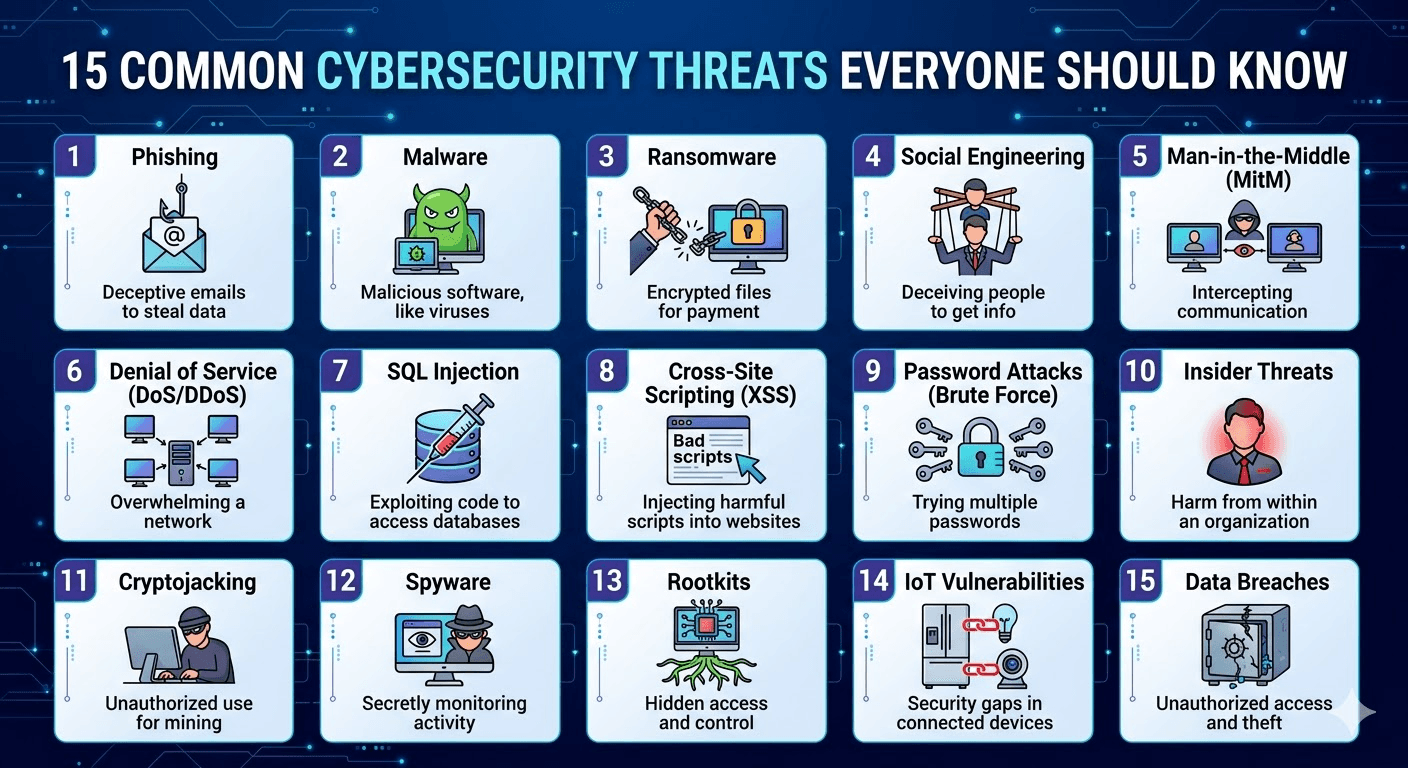
Cybersecurity isn’t just for IT professionals anymore—it’s a daily necessity for anyone using the internet. From personal banking to business operations, digital threats are evolving rapidly, becoming more sophisticated and harder to detect.
In 2026, cyber threats aren’t just a headline—they’re a daily reality affecting everyone from individuals checking email in Indianapolis to global enterprises. With AI supercharging attacks, ransomware costs projected to hit $74 billion annually, and phishing remaining a top entry point for breaches, awareness is your first line of defense.
This beginner-friendly guide breaks down 15 common cybersecurity threats everyone should know in 2026. Each includes a simple explanation, why it’s dangerous right now, real-world impact, and practical steps to protect yourself.
In this guide, you’ll learn the 15 most common cybersecurity threats you need to recognize—and how to stay protected in 2026.
🔐 1. Phishing Attacks
Phishing is one of the most widespread cyber threats. Attackers impersonate trusted sources (banks, companies, or even coworkers) to trick users into revealing sensitive data.
Example: Fake emails asking you to “reset your password.”
How to stay safe:
- Never click suspicious links
- Check email sender addresses carefully
- Use multi-factor authentication (MFA)
🦠 2. Malware
Malware is malicious software designed to harm or exploit systems.
Types include:
- Viruses
- Worms
- Trojans
Prevention tips:
- Install antivirus software
- Avoid downloading files from unknown sources
- Keep software updated
💣 3. Ransomware
Ransomware locks your data and demands payment to restore access.
Real-world impact: Hospitals, businesses, and even governments have been targeted.
Protection:
- Regular backups
- Avoid suspicious downloads
- Use endpoint security tools
🎭 4. Social Engineering
This involves manipulating people rather than hacking systems.
Example: Someone pretending to be IT support asking for your password.
Defense:
- Never share sensitive information
- Verify identities before responding
🔓 5. Password Attacks
Hackers use brute force or stolen credentials to access accounts.
Common methods:
- Credential stuffing
- Dictionary attacks
Solution:
- Use strong, unique passwords
- Enable MFA
- Use password managers
🌐 6. Man-in-the-Middle (MITM) Attacks
Attackers intercept communication between two parties.
Example: Public Wi-Fi interception.
Stay safe:
- Avoid unsecured public networks
- Use VPNs
- Use HTTPS websites only
🧬 7. Zero-Day Exploits
These attacks exploit unknown vulnerabilities before developers can fix them.
Risk level: Extremely high
Mitigation:
- Regular updates
- Advanced threat detection systems
🕵️ 8. Spyware
Spyware secretly monitors your activity and collects data.
Targets:
- Browsing habits
- Login credentials
Prevention:
- Install trusted apps only
- Use anti-spyware tools
🧾 9. Data Breaches
Sensitive data gets exposed due to weak security.
Examples of data:
- Emails
- Passwords
- Credit card details
Protection:
- Encrypt sensitive data
- Monitor accounts regularly
🤖 10. AI-Powered Attacks
Cybercriminals now use AI to create smarter scams.
Examples:
- Deepfake videos
- AI-generated phishing emails
Defense:
- Stay informed
- Verify unusual requests
🌩️ 11. DDoS (Distributed Denial-of-Service) Attacks
Attackers flood servers with traffic, causing outages.
Impact:
- Website downtime
- Loss of revenue
Prevention:
- Use cloud-based protection
- Monitor network traffic
📱 12. Mobile Malware
Smartphones are increasingly targeted.
Common threats:
- Malicious apps
- SMS phishing (Smishing)
Stay protected:
- Download apps only from official stores
- Avoid clicking unknown links
🧑💻 13. Insider Threats
Threats from employees or trusted individuals.
Types:
- Malicious insiders
- Negligent employees
Solution:
- Access control
- Employee training
🌍 14. IoT Vulnerabilities
Smart devices (cameras, thermostats, etc.) can be exploited.
Why risky:
- Weak default security
- Lack of updates
Protection:
- Change default passwords
- Update firmware regularly
🎣 15. Supply Chain Attacks
Attackers target third-party vendors to access larger systems.
Example: Compromised software updates
Defense:
- Vet vendors carefully
- Monitor third-party access
🚀 Final Thoughts
Cyber threats are constantly evolving, but awareness is your first line of defense. Whether you’re an individual or running a business, understanding these risks can save you from serious financial and data loss.
🔑 Quick Cybersecurity Checklist
- Use strong passwords + MFA
- Keep software updated
- Avoid suspicious links
- Backup data regularly
- Use antivirus & firewall protection
📈 Pro Tip for 2026
Cybersecurity is no longer optional—it’s a digital survival skill. Investing a little time in learning these threats can protect your identity, money, and privacy.