If you’ve ever wondered how apps like Netflix, Airbnb, or your favorite websites handle millions of users without crashing — the answer often lies in AWS architecture.
In this guide, we’ll break down AWS architecture in the simplest way possible, so even beginners can understand how it works and how to use it.
What Is AWS Architecture?
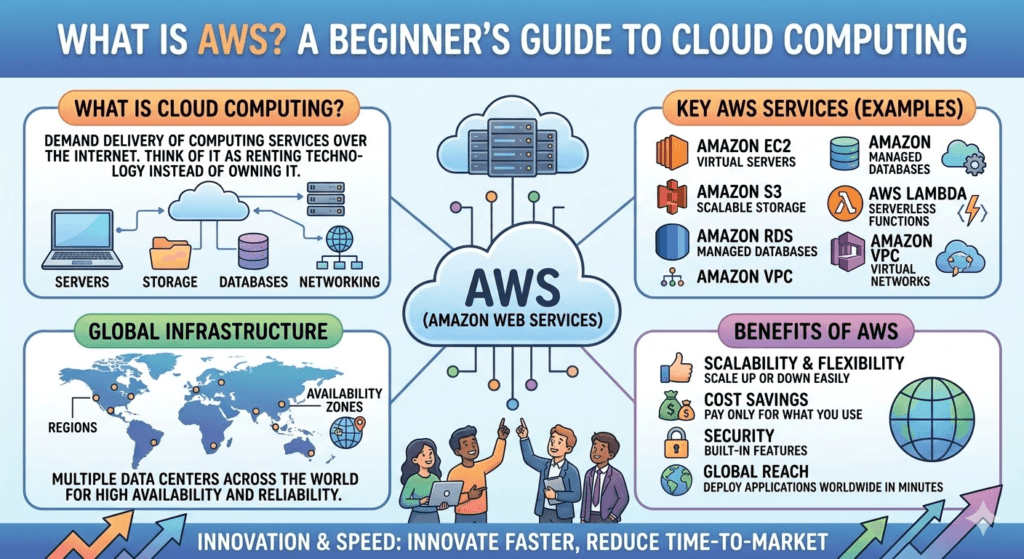
AWS architecture refers to how different cloud services from Amazon Web Services are structured and connected to build scalable, secure, and reliable applications.
Think of it like building a house:
- Compute = Rooms (where things happen)
- Storage = Closets (where data is stored)
- Networking = Roads (how things connect)
- Security = Locks & cameras (protection)
The Core Components of AWS Architecture
Let’s simplify AWS into 5 main building blocks:
1. Compute (The Brain 🧠)
This is where your application runs.
Popular services:
- Amazon EC2 – Virtual servers in the cloud
- AWS Lambda – Run code without managing servers
- AWS Elastic Beanstalk – Easy app deployment
👉 Example: A website running on EC2 handles user requests.
2. Storage (The Memory 💾)
Where your data lives.
Popular services:
- Amazon S3 – Store files like images, videos
- Amazon EBS – Storage for EC2
- Amazon Glacier – Long-term backups
👉 Example: Images uploaded by users are stored in S3.
3. Database (Organized Data 📊)
Structured storage for apps.
Popular services:
- Amazon RDS – MySQL, PostgreSQL, etc.
- Amazon DynamoDB – Fast, scalable NoSQL
- Amazon Aurora – High-performance database
👉 Example: User login data is stored in RDS.
4. Networking (The Roads 🌐)
Connects everything together securely.
Popular services:
- Amazon VPC – Private network
- Elastic Load Balancing – Distributes traffic
- Amazon Route 53 – Domain routing
👉 Example: Load balancer ensures your site doesn’t crash during high traffic.
5. Security (The Shield 🔐)
Keeps your system safe.
Popular services:
- AWS IAM – Control user permissions
- AWS Shield – Protect from attacks
- AWS WAF – Filters malicious traffic
👉 Example: IAM controls who can access your servers.
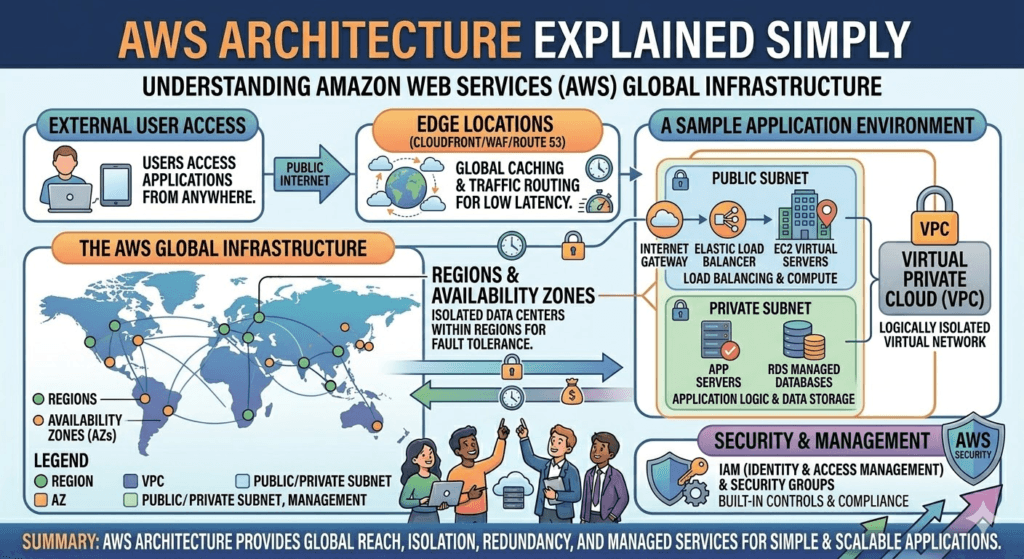
How AWS Architecture Works Together (Simple Flow)
Here’s a real-world simplified flow:
- User visits your website
- Amazon Route 53 directs them to your app
- Elastic Load Balancing spreads traffic
- Amazon EC2 processes requests
- Data is fetched from Amazon RDS
- Files come from Amazon S3
- Response is sent back to the user
Simple AWS Architecture Diagram (Text Version)
User
  ↓
Route 53 (DNS)
  ↓
Load Balancer
  ↓
EC2 / Lambda (App Layer)
  ↓
Database (RDS / DynamoDB)
  ↓
Storage (S3)
Key AWS Architecture Principles
To build strong systems, AWS follows these principles:
✔ Scalability
Automatically increase or decrease resources based on traffic.
✔ High Availability
Use multiple servers and regions so your app never goes down.
✔ Fault Tolerance
System continues working even if one part fails.
✔ Security First
Everything is designed with strict access control and protection.
✔ Cost Optimization
Pay only for what you use.
Real-World Example
Imagine you’re building a blog like InspireViralTimes.com:
- Frontend hosted on EC2 or via CDN
- Images stored in S3
- User data stored in RDS
- Traffic managed by Load Balancer
- Security handled by IAM + WAF
This setup can handle thousands to millions of visitors smoothly.
Beginner-Friendly AWS Architecture (Best Starter Setup)
If you’re just starting, use this simple architecture:
- EC2 (for hosting)
- S3 (for static files)
- RDS (for database)
- Route 53 (for domain)
- CloudFront (for speed)
👉 This is enough to build a professional website.
Common AWS Architecture Patterns
1. Monolithic Architecture
Everything in one server (simple but not scalable)
2. Microservices Architecture
Small independent services (modern and scalable)
3. Serverless Architecture
No servers, just functions (using AWS Lambda)
Why AWS Architecture Matters
Good architecture helps you:
- Avoid downtime
- Handle traffic spikes
- Save money
- Improve performance
- Scale your business
Final Thoughts
AWS architecture may seem complex at first, but once you break it down, it’s just a combination of compute, storage, database, networking, and security working together.
Start simple, understand the basics, and gradually build more advanced systems.